
Kinsta WordPress Hosting
Kinsta is a strong managed WordPress host with support that outperforms most competitors. But the pricing model punishes growth, and the add-on costs add up fast. If your site generates revenue, it’s a solid pick. If it doesn’t, you’re overpaying.
TL;DR
- Kinsta runs on Google Cloud C3D with Cloudflare CDN and has hit 100% uptime for three straight years in independent testing.
- Developer tools are first-class: SSH, Git push-to-deploy, WP-CLI, staging environments, and DevKinsta for local dev.
- The catch: starter plans only get 2 PHP workers, Redis costs $100/mo, and visit-based billing counts 50-70% more than Google Analytics shows.
- Best for agencies and revenue-generating WordPress sites. Skip it for personal blogs or tight budgets.
You can spin up a WordPress server on a $5/mo VPS and manage everything yourself. I’ve done it. I wrote a guide on setting up your own WordPress server, and it works. But there’s a cost that doesn’t show up on the invoice: the 2 AM alerts when something breaks, the security patches you forgot about, the hours spent debugging Nginx configs when you should be writing code or content.
That’s the pitch for managed WordPress hosting. And Kinsta is the name that keeps coming up when developers ask Reddit which host to pick. With a 4.8/5 on Trustpilot, the #1 spot on G2’s 2026 hosting awards, and pricing that starts at $35/mo, it’s positioned as the premium choice.
But “premium” is doing a lot of heavy lifting in that sentence. I dug into Kinsta’s real pricing, actual developer workflow, performance data, and the complaints that keep surfacing on Reddit and Trustpilot to figure out whether it’s worth the money, or if it’s just expensive.
What Is Kinsta?
Kinsta is a managed WordPress host that runs exclusively on Google Cloud Platform. Every site gets its own isolated LXD container on C3D virtual machines (4th-gen AMD EPYC processors, DDR5 memory). Traffic routes through Cloudflare’s CDN with 300+ edge locations.
The company has been around since 2013 and hosts over 230,000 businesses. In February 2026, Kinsta spun off its non-WordPress hosting (applications, databases, static sites) into a separate product called Sevalla. Kinsta is now WordPress-only, which is either laser focus or a limitation depending on your needs.
The support team deserves special mention because it’s the single most praised feature across every review site. Median response time under 2 minutes, 97% satisfaction rate, and the agents are actual WordPress engineers. No chatbots, no tier-1 script readers. You get someone who knows what wp_options autoload bloat is and can fix it. In 10 languages, 24/7/365.
Developer Experience
This is where every other Kinsta review falls short. They’ll list “SSH access” as a bullet point and move on. Here’s what the developer workflow looks like in practice.
SSH and command line: Every plan includes SSH access. You get WP-CLI, Composer, and Git out of the box. The SSH connection details are in the MyKinsta dashboard under Sites > Info. You can run wp plugin list, wp db export, or any WP-CLI command directly on your production or staging environment.
Git integration: Kinsta supports Git push-to-deploy. You can set up a workflow where pushing to a specific branch triggers deployment to your staging or live environment. It’s compatible with Bedrock and Trellis if that’s your stack. For CI/CD, you can wire up GitHub Actions to deploy via SSH, which is what most teams end up doing.
Staging: Every plan includes one standard staging environment. You can push staging to live or pull live to staging with one click. The standard staging environment runs on reduced resources (1 CPU core), so if you need to test performance or run heavy operations, premium staging ($20/mo) gives you 12 CPUs and 8GB RAM.
DevKinsta: Kinsta’s free local development tool is Docker-based and runs on Mac, Windows, and Linux. It supports PHP 7.2 through 8.3, comes with a local database manager, and lets you push directly to your Kinsta staging environment. Over 60,000 developers use it. If you’ve used Local by Flywheel, DevKinsta is a comparable tool, but with tighter integration to your Kinsta hosting.
Kinsta API: The REST API lets you automate site management, run WP-CLI commands remotely, manage plugins and themes, and pull analytics. It’s useful for agencies managing multiple client sites or anyone who wants to script their deployment pipeline.
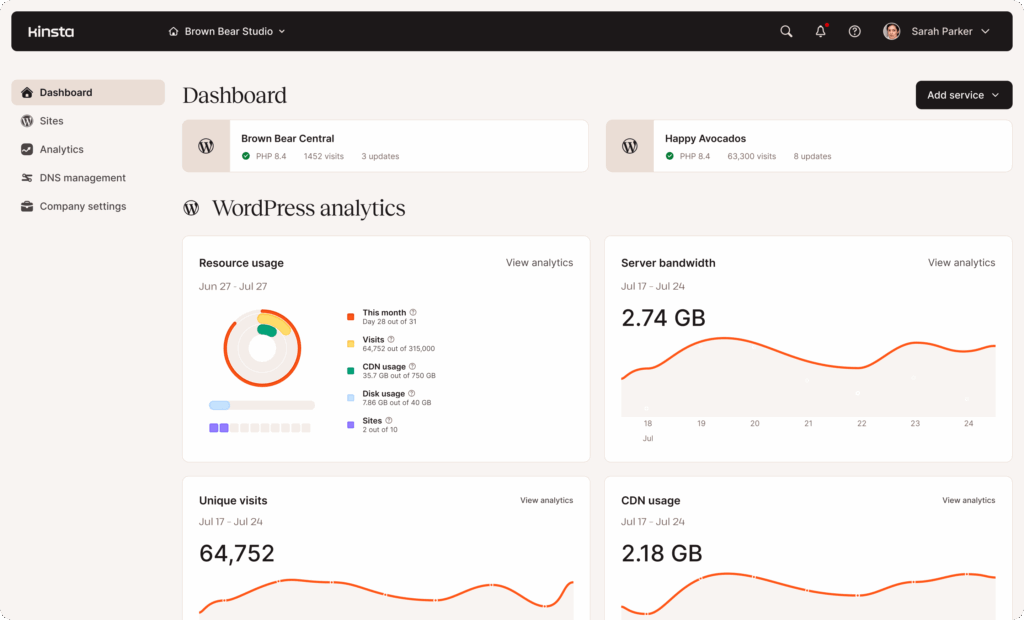
MyKinsta dashboard: There’s no cPanel. Kinsta uses a proprietary dashboard called MyKinsta. It’s clean, fast, and purpose-built for WordPress. The flip side is vendor lock-in: your workflow and familiarity don’t transfer to any other host. If you’ve standardized on cPanel across clients, that’s a factor.
Performance and Uptime
Kinsta’s performance claims are backed by real data, which is more than most hosts can say.
Uptime: ToolTester runs independent monitoring across dozens of hosts. Kinsta hit 100% uptime for three consecutive years (2020-2022), the only host to achieve that in their testing. The SLA guarantees 99.9% (99.99% on enterprise plans), which translates to a maximum of 52.6 minutes of downtime per year.
Response time: Independent stress tests show 27ms average response under load (Hostingstep). In raw page-load benchmarks, Kinsta averages 1.82 seconds. That’s not the fastest in testing. GreenGeeks (1.29s), A2 Hosting (1.30s), and Cloudways (1.46s) all beat it. But there’s context: those hosts run different infrastructure types. Kinsta’s managed overhead (isolated containers, automatic scaling, security layers) adds latency that shared hosting doesn’t have. Edge Caching brings TTFB down by about 50% for returning visitors.
Infrastructure: The C3D machines are a genuine upgrade. Kinsta reports MySQL query times dropping from 89ms to 0.9ms after the C3D rollout. Combined with server-level full-page caching and Cloudflare’s CDN, a well-optimized WordPress site on Kinsta loads fast for visitors regardless of location.
If you want to squeeze more speed out of any WordPress host, our WordPress performance optimization guide covers the techniques that matter most.
⚡ About Cloudflare: Kinsta routes all traffic through Cloudflare, but it’s not the full Cloudflare Enterprise package. Argo Smart Routing (which typically cuts TTFB by ~33%) is not included. If you already pay for Cloudflare Pro or Business, you’ll lose some features by moving to Kinsta’s integration.
Pricing Breakdown: What You’ll Pay in Practice
This is where most reviews drop a pricing table and move on. But Kinsta’s real cost depends on your site, and it’s almost always more than the base plan price.
| Plan | Monthly | Annual (per mo) | Sites | Visits | Storage | PHP Workers |
|---|---|---|---|---|---|---|
| Single 35k | $35 | $30 | 1 | 35,000 | 10 GB | 2 |
| Single 65k | $50 | $42 | 1 | 65,000 | 10 GB | 4 |
| Single 125k | $90 | $75 | 1 | 125,000 | 10 GB | 6 |
| WP 2 | $70 | $59 | 2 | 70,000 | 20 GB | 4 |
| WP 5 | $115 | $96 | 5 | 125,000 | 30 GB | 6 |
Kinsta also introduced bandwidth-based plans in late 2025. Same prices, but you get unlimited visits and a CDN bandwidth cap instead. This is the better option if your site gets a lot of bot traffic (more on that below).
The add-on reality: Here’s where the bill grows. Redis object caching is $100/mo. That’s for open-source software that Cloudways includes free. Premium staging is $20/mo. Extra disk space beyond 10GB is $20/mo per 20GB. Hourly backups are $100/mo. Nginx reverse proxy is $50/mo.
Real-world scenario, portfolio site: Single 35k plan at $30/mo annual. 10GB is enough, 2 PHP workers handle a static-ish blog fine. Total: $30/mo. Straightforward.
Real-world scenario, WooCommerce store with 80K monthly visitors: Single 125k plan ($75/mo) because you’ll need 6 PHP workers for dynamic cart/checkout pages. Add Redis for session handling ($100/mo). Your Google Analytics shows 80K visitors, but Kinsta’s server logs will count closer to 130-140K because of bots and ad-blocker-invisible traffic. Total: $175/mo minimum, and you’re sweating the visit cap.
The visit counting problem: This is the most common billing complaint on Reddit and Trustpilot. Kinsta counts unique IP addresses per 24-hour period from server logs. Google Analytics uses JavaScript tracking that ad blockers can prevent. The gap is typically 50-70% higher on Kinsta’s count. Kinsta’s CTO acknowledged this and launched bandwidth-based plans as an alternative. If you’re on a visit-based plan, our guide on blocking bot traffic can help reduce inflated counts.
Overage fees: If you exceed your plan’s visit limit, overages are $0.50-$1.00 per 1,000 extra visits, charged when they exceed your plan cost. A traffic spike from a viral post can get expensive fast.
See current Kinsta plans and pricing
The Banned Plugin Situation
Kinsta bans specific categories of WordPress plugins. If you’re coming from shared hosting or a self-managed VPS where you control everything, this will feel restrictive.
Caching plugins (banned): W3 Total Cache, WP Super Cache, Cache Enabler. Kinsta handles caching at the server level, so these plugins conflict with their infrastructure. WP Rocket v3.0+ is allowed, but its caching features are automatically disabled. You keep the other stuff: minification, lazy loading, database optimization.
Backup plugins (restricted): UpdraftPlus, BackupBuddy, All-in-One WP Migration, Duplicator Pro. Kinsta handles daily backups with 14-day retention. The reasoning makes sense (server-side backup plugins compete for resources with Kinsta’s own backup system), but it means you’re dependent on their backup schedule unless you pay for the 6-hour ($20/mo) or hourly ($100/mo) add-on.
Image optimization (server-based banned): Plugins that compress images on the server are blocked because they spike CPU usage. Cloud-based alternatives like Imagify, ShortPixel, and TinyPNG work fine since the processing happens off-server.
Security plugins: Wordfence is allowed with specific configuration (Extended Protection mode). Most other security plugins work since Kinsta provides its own WAF, DDoS protection, and malware scanning.
The honest take: if you’ve built a WordPress workflow around specific caching or backup plugins, migrating to Kinsta means changing that workflow. Kinsta’s built-in alternatives are good, but “good” and “what I’m used to” aren’t always the same thing.
The PHP Worker Reality
PHP workers are how many simultaneous requests your site can process at once. Think of them like checkout lanes at a grocery store. Two lanes means two customers at a time. Everyone else waits in line. If the line gets too long, customers leave (your visitors see 503 errors).
Kinsta’s starter plan gives you 2 PHP workers. For a blog with server-level caching, that’s fine. Cached pages don’t need a PHP worker at all. But the moment your site has uncacheable requests (WooCommerce carts, membership portals, admin-heavy operations, search queries, form submissions), each one occupies a worker until the request completes.
WooCommerce is the common pain point. Cart pages, checkout, account pages, and AJAX calls are all dynamic and uncacheable. A store with 20 concurrent shoppers can easily need 6+ PHP workers, which means the $75-90/mo plan minimum.
Reddit users regularly describe this as Kinsta “starving your site of resources and selling them back as add-ons.” That’s harsh but not entirely wrong. The upgrade path is: hit your worker limit, get 503 errors or slow responses, upgrade to a more expensive plan to get more workers. There’s no autoscaling option.
To be fair, most managed WordPress hosts have similar limits. The difference is transparency: Kinsta makes the limits explicit, which means you know exactly why your site is slow. On shared hosting, you’d hit the same bottleneck without any visibility into the cause.
Kinsta Pros & Cons
After digging into the infrastructure, developer tools, pricing, and restrictions, here’s where Kinsta lands. The strengths are genuine, and so are the trade-offs.
Pros
- 100% uptime track record (independently verified)
- Support team of actual WordPress engineers
- Full developer toolkit: SSH, Git, WP-CLI, staging, API
- DevKinsta local dev with staging sync
- Google Cloud C3D with Cloudflare CDN
- Free migrations with no downtime
- Built-in APM tool at no extra cost
Cons
- Expensive: starts $35/mo for a single site
- Visit counting inflates 50-70% vs Google Analytics
- Redis is $100/mo (free on most competitors)
- Only 2 PHP workers on starter plan
- Banned plugin categories limit flexibility
- No email hosting, no phone support
- Cloudflare integration missing Argo Smart Routing
- WordPress only (no other CMS or frameworks)
Kinsta vs Cloudways
This is the comparison question that dominates every Reddit hosting thread, so let’s address it directly.
Choose Kinsta if:
- You want zero server management (truly hands-off)
- Support quality is a top priority
- You need SOC2/ISO 27001 compliance
- Budget is secondary to reliability
Choose Cloudways if:
- You’re comfortable with some server config
- Price matters (entry at ~$14/mo vs $35)
- You want Redis included free
- You need flexibility across cloud providers
Kinsta’s biggest advantage over Cloudways is the support. Kinsta’s team can step into your WordPress installation and debug issues. Cloudways support knows their platform but won’t dig into your theme or plugin conflicts. That difference is worth the price gap for anyone who’s lost hours debugging something a support agent could have identified in minutes. We break down pricing scenarios, benchmarks, and developer workflows in detail in our full Cloudways vs Kinsta comparison.
Cloudways’ biggest advantage is flexibility. (We’ve also published a full Cloudways review if you want the deep dive.) You choose from DigitalOcean, Vultr, AWS, or Google Cloud. You get pay-as-you-go pricing with no visit caps. Redis is included on all plans. And the entry point is less than half of Kinsta’s.
One important note: Cloudways was acquired by DigitalOcean in 2022, and prices have been increasing since. Several cloud providers have been removed from the platform. This trend may continue, which narrows the flexibility advantage over time.
Frequently Asked Questions
Does Kinsta offer a free trial?
Yes. Kinsta offers a free first month on entry-level plans and a 30-day money-back guarantee on all plans. You can test the platform, migrate a site, and evaluate performance with no risk.
Can I use my own caching plugin on Kinsta?
No. Kinsta handles caching at the server level and bans dedicated caching plugins like W3 Total Cache and WP Super Cache. WP Rocket is allowed, but its caching features are auto-disabled. You keep its other features like minification and lazy loading.
How does Kinsta count visits vs Google Analytics?
Kinsta counts unique IP addresses per 24 hours from server logs. Google Analytics uses client-side JavaScript that ad blockers can prevent. Kinsta’s count is typically 50-70% higher than GA. Kinsta now offers bandwidth-based plans as an alternative if this is a concern.
Is Kinsta good for WooCommerce?
Performance-wise, yes. Kinsta’s isolated containers and C3D machines handle WooCommerce well. Cost-wise, budget $175-300+/mo for a real store. You’ll need more PHP workers for dynamic cart/checkout pages and likely the Redis add-on ($100/mo) for session handling.
Does Kinsta include email hosting?
No. Kinsta focuses exclusively on WordPress hosting and does not provide email services. You’ll need a separate provider like Google Workspace ($7/user/mo), Microsoft 365, or a dedicated email host.
What happens if Kinsta bans a plugin I’m using?
During migration, Kinsta’s team flags incompatible plugins and suggests alternatives. For caching, their server-level solution replaces what your plugin did. For backups, Kinsta provides daily automatic backups. The transition requires adjusting your workflow, but the alternatives are functional. If you’re planning a move, our WordPress migration guide covers the full zero-downtime process.
Final Verdict
Kinsta is one of the top managed WordPress hosts available right now, and it’s also one of the most expensive. Those two facts coexist comfortably.
The support alone justifies the price for sites that generate revenue. Having a WordPress engineer diagnose and fix an issue in under 2 minutes at 3 AM is worth more than the monthly cost difference between Kinsta and a budget host. The 100% uptime record, developer tools, and Google Cloud infrastructure are the bonus.
But the pricing model has real problems. Visit counting that’s 50-70% higher than GA. Redis at $100/mo for open-source software. Two PHP workers on the starter plan. These feel like they’re designed to push you toward more expensive plans rather than let you grow into them naturally.
If your WordPress site makes money, Kinsta is a solid investment. If it doesn’t, you’re better off with Cloudways or a managed VPS like ScalaHosting (which includes root access and a free control panel) until the revenue justifies the upgrade.
Final Verdict
A top-tier managed WordPress host, with pricing that only makes sense if your site generates revenue.