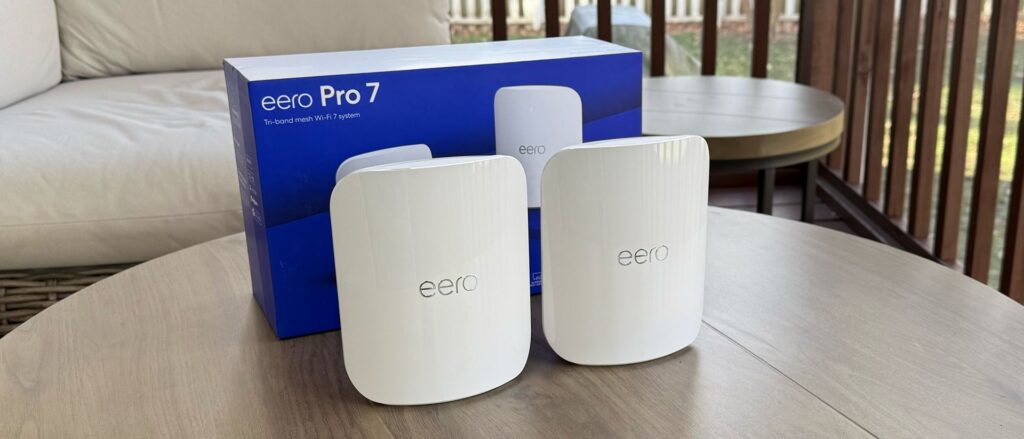
After years of watching my Comcast bill creep up while my upload speed sat in the gutter, I switched to Frontier Fiber and the difference was not subtle. Same money, a fraction of the latency, upload speeds that finally match my downloads, and no more 1.2 TB data cap hanging over every 4K stream and game download. This is the honest breakdown of moving from Comcast cable to Frontier Fiber: what actually changes, how the pricing compares, and why the included eero Wi-Fi gear quietly turned out to be one of the best parts of the whole deal.
🚀 Check first: Frontier Fiber is rolling out region by region, so the only thing that matters is whether it reaches your address. Check Frontier Fiber availability at your address here before you do anything else.
Key Takeaways
- Symmetrical speed is the real upgrade: Frontier Fiber gives you the same upload as download (up to 7,000 Mbps), where Comcast cable tops out around 100 to 250 Mbps upload no matter how fast your download is.
- No data cap, no rented modem: Frontier has no monthly data cap and includes the router free, instead of Comcast’s 1.2 TB cap and roughly $15 a month gateway rental.
- Often the same price or less: one customer reported paying $123 a month for 500 Mbps on Xfinity versus about $45 on Frontier Fiber for the same speed.
- The eero gear is excellent: Frontier includes a tri-band Wi-Fi 7 eero Pro 7 (or eero Max 7 on the top tiers), a real whole-home mesh system, not a single rented box.
- The one catch is coverage: Frontier Fiber is regional, so the whole decision comes down to whether it is available at your address. Check availability here.
Why I Left Comcast Cable
The breaking point was the bill. Comcast prices are friendly for the first year or two, then the promo expires and the rate jumps, often by $20 to $40 a month, for the exact same service. On top of that came the equipment rental, around $15 a month for the xFi gateway, and the looming 1.2 TB data cap that most Xfinity cable plans carry in the majority of markets, with overage charges of $10 per 50 GB once you cross it.
The speed told the same story. Cable download speeds can look fine on paper, but the upload is the tell. Xfinity cable uploads usually land somewhere between 100 and 250 Mbps even on fast plans, and that bottleneck shows up every time you back up photos to the cloud, hop on a video call, stream to Twitch, or send a large file. Cable is also a shared medium, so your neighborhood node slows down at peak hours when everyone is online at once.
Fiber vs Cable: What Actually Changes
Fiber sends data as light through glass strands instead of electrical signals over coaxial copper. That single difference drives every advantage you feel day to day.
- Symmetrical speeds: fiber uploads match downloads. A Frontier 500 Mbps plan is 500 down and 500 up. A comparable cable plan might be 500 down and 20 up.
- Lower latency: fiber has less lag, which matters for online gaming, video calls, and anything real-time. If you have been chasing every millisecond, our guide on how to reduce input lag pairs well with a low-latency connection.
- More reliable: fiber is less affected by weather, electrical interference, and the peak-hour congestion that slows shared cable nodes.
- Future proof: the same fiber line can carry multi-gigabit speeds as plans scale up, without rewiring your street.
The headline that gets people to switch is download speed, but the upload is what you actually notice. Moving from a typical cable plan to Frontier Fiber can mean as much as 5x the download speed depending on the tier you pick, and 10 to 20 times the upload, frequently for the same money or less.
Frontier Fiber Plans and Pricing
Frontier Fiber plans are symmetrical, have no data caps, no annual contract, and include free installation plus a free eero router. Here is the current lineup as of June 2026, with AutoPay. Promotional pricing varies by address and market, so treat these as a guide and confirm the exact number for your home.
| Plan | Speed (down / up) | Starting Price | Included eero |
|---|---|---|---|
| Fiber 500 | 500 / 500 Mbps | ~$39.99/mo | eero Pro 7 (Wi-Fi 7) |
| Fiber 1 Gig | 1,000 / 1,000 Mbps | ~$64.99/mo | eero Pro 7 (Wi-Fi 7) |
| Fiber 2 Gig | 2,000 / 2,000 Mbps | ~$64.99/mo | eero Pro 7 (Wi-Fi 7) |
| Fiber 5 Gig | 5,000 / 5,000 Mbps | ~$89.99/mo | eero Max 7 (Wi-Fi 7) |
| Fiber 7 Gig | 7,000 / 7,000 Mbps | ~$109.99/mo | two eero Max 7 |
🚀 Best move: The 500 Mbps and 1 Gig tiers are the sweet spot for most homes coming from cable. See which Frontier Fiber plan is available at your address.
The eero Tech Is the Quiet Win
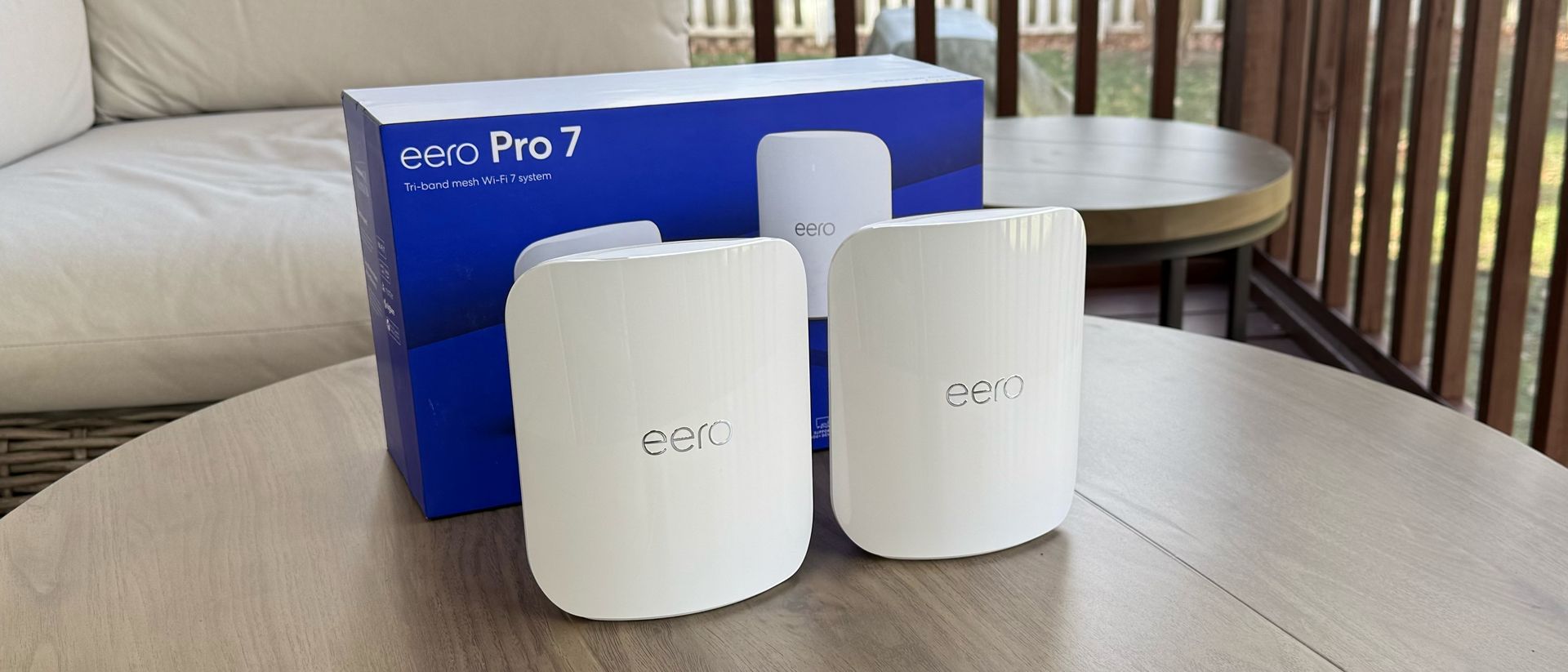
This is the part nobody tells you about until you live with it. Comcast hands you a single rented gateway and charges you monthly for the privilege. Frontier includes an eero system free with the plan, and eero is one of the best consumer mesh Wi-Fi brands there is. On most fiber tiers you get the tri-band eero Pro 7 with Wi-Fi 7, and the 5 Gig and 7 Gig plans step up to the eero Max 7, with the top plan including two units out of the box.
The Hardware
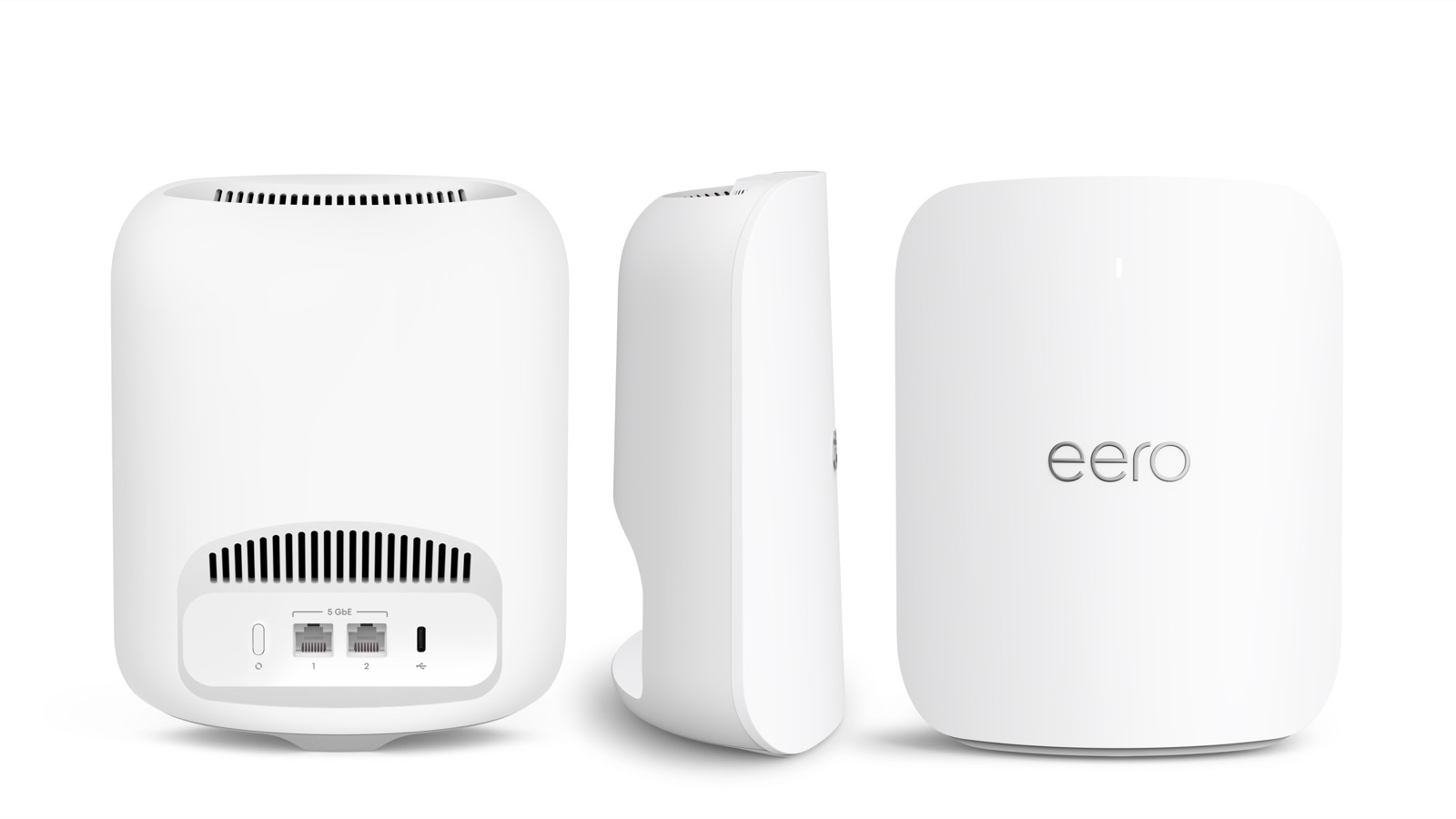
The eero Pro 7 and Max 7 are tri-band Wi-Fi 7 routers, the most current Wi-Fi standard. Each unit covers up to about 2,000 square feet and handles 200 or more connected devices, which is the kind of headroom a modern smart home with phones, TVs, speakers, cameras, and laptops actually needs. The units have multi-gig ethernet ports, so wired devices can use the full fiber speed rather than being capped at gigabit.
True Whole-Home Mesh
This is where eero pulls away from a rented cable gateway. eero is a mesh system, which means you can add more eero units anywhere in the house and they form one network under a single Wi-Fi name. Walk from the living room to the back bedroom and your phone hands off between units automatically, with no dead zones and no separate “extender” network to switch to. A single box from the cable company simply cannot cover a multi-floor or sprawling home the way three meshed eeros can.
The App Makes It Effortless
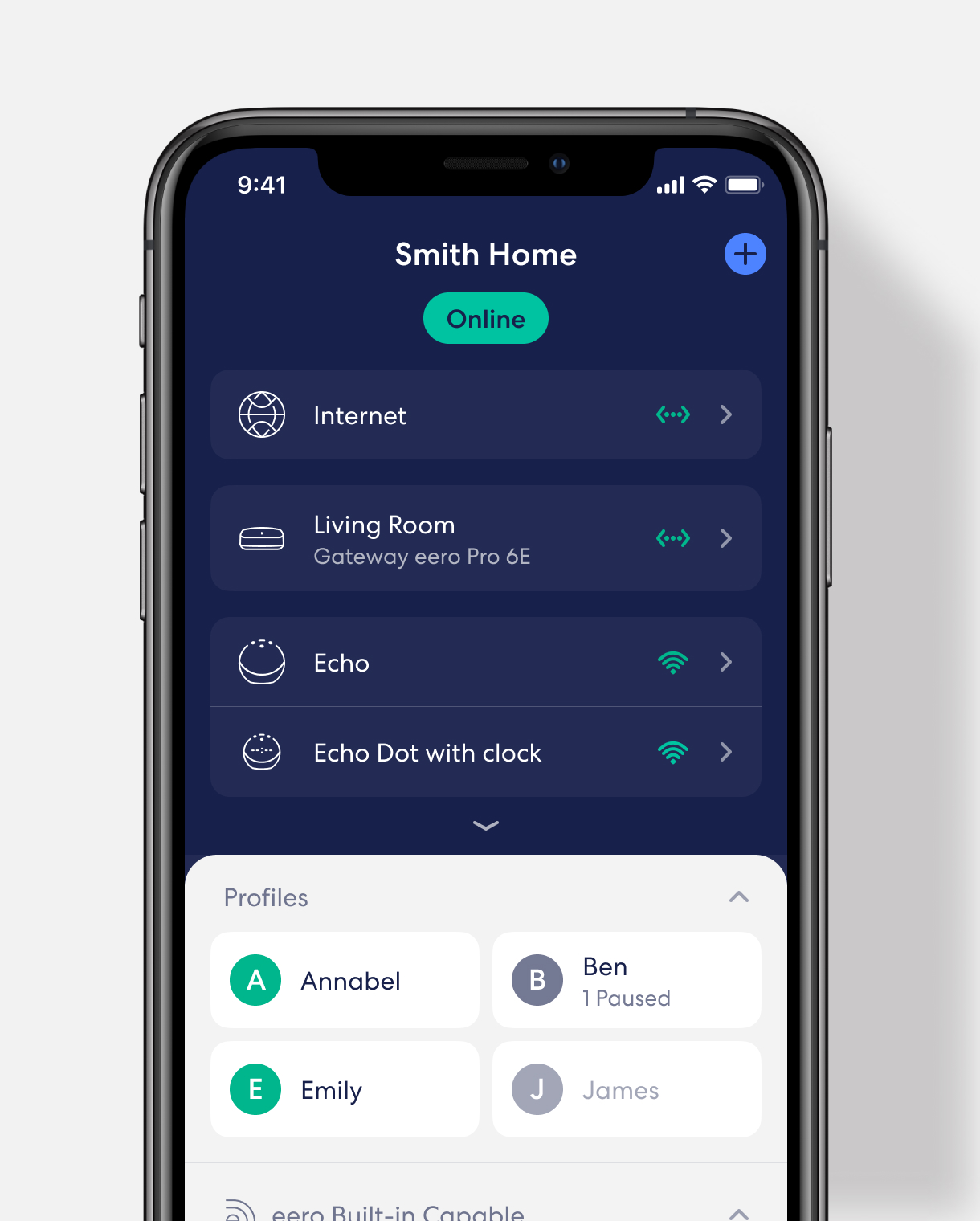
Setup runs through the eero app and genuinely takes minutes. The app is where eero shines compared to the clunky web pages of a typical router. You can see every connected device, group devices into per-person profiles, pause the internet for a profile at dinner or bedtime, set up a guest network with a tap, and run a speed test, all from your phone whether you are home or not.
Security With eero Secure
eero also offers eero Secure, an optional subscription that layers real security on top of the hardware. It adds active threat protection that blocks known malicious sites, advanced parental content filtering, ad blocking across the whole network, and a VPN through Guardian for private browsing. Higher tiers fold in Malwarebytes antivirus covering up to 20 devices plus identity monitoring. The hardware is included free with Frontier; eero Secure is the upsell, and for families it is often worth it.
The practical takeaway: with Comcast you rent a single box and pay for it monthly. With Frontier you own the use of a genuine mesh system with a best-in-class app, and you can grow it as your home grows.
Frontier vs Comcast, Side by Side
| Feature | Frontier Fiber | Comcast Xfinity (Cable) |
|---|---|---|
| Connection | Fiber optic | Cable (coaxial) |
| Download speeds | 200 Mbps to 7 Gbps | 300 Mbps to 2 Gbps |
| Upload speeds | Symmetrical, up to 7 Gbps | ~100 to 250 Mbps |
| Data cap | None | 1.2 TB in most markets ($10 per 50 GB over) |
| Equipment | Free eero Wi-Fi mesh | ~$15/mo gateway rental |
| Installation | Free | Up to $100 |
| Contract | No annual contract | Promo pricing rises after 1 to 2 years |
The honest caveat in Comcast’s favor: its cable network reaches far more addresses nationwide, and where Frontier fiber is not available, Xfinity is usually the faster option versus DSL. Both companies also raise prices after the promo period, so neither is a saint on billing. But where you can get fiber, the symmetrical speed, no data cap, and included eero gear tilt the value heavily toward Frontier.
Is Switching to Frontier Fiber Worth It?
Switch If
- Frontier Fiber is available at your address (the whole decision).
- You upload a lot: video calls, cloud backups, streaming, content creation.
- You are tired of data caps and rented equipment fees.
- You want a real mesh system instead of one cable box.
- Your Comcast promo expired and the bill jumped.
Maybe Wait If
- Frontier fiber has not reached your street yet (check first).
- You are mid-contract with Comcast and an early exit fee outweighs the savings.
- You only need light browsing and already pay very little.
🚀 One step: The entire decision hinges on availability. Check whether Frontier Fiber is available at your address, and if it is, the value case basically makes itself.
Wire It Up: Gear for Your New Fiber
Fiber gives you the speed, but Wi-Fi and old cables can throttle it before it reaches your devices. To actually feel a gigabit-plus plan, wire your most important devices and add ports where you need them. Here is the simple kit, with live prices as of June 2026.

UGREEN Cat 8 Ethernet Cable (6 ft)
Run your desktop or console straight to the eero for the full wired speed.

TP-Link 16-Port Gigabit Switch
Add wired ports for the TV, console, NAS, and office in one spot.

UGREEN Cat 8 Flat Cable (3 ft)
A tidy short cable for gear sitting right next to the router.
Between upgrades, Berry Finds tracks real-time Amazon deals on thousands of everyday products across home, kitchen, beauty, and more so you never overpay on the stuff you buy regularly.
Fiber’s low latency and symmetrical upload also make working and gaming from home noticeably smoother. If you are building out a home office around the new connection, our picks for the best monitors for work and gaming and the best noise cancelling headphones under $100 round out a setup that finally has the bandwidth to back it up.
Frequently Asked Questions
Is Frontier Fiber faster than Comcast cable?
For uploads, dramatically. Frontier Fiber is symmetrical, so a 500 Mbps plan uploads at 500 Mbps, while comparable Comcast cable plans upload around 100 to 250 Mbps. Frontier also offers higher top download speeds, up to 7 Gbps versus Xfinity’s roughly 2 Gbps ceiling. The catch is availability, since Frontier fiber is regional.
Does Frontier Fiber have a data cap?
No. Frontier Fiber plans have no monthly data cap and no overage charges. Most Comcast Xfinity cable plans carry a 1.2 TB monthly cap in the majority of markets, with charges of about $10 per additional 50 GB if you exceed it.
What eero router does Frontier include?
Frontier includes a tri-band Wi-Fi 7 eero at no extra cost. Most fiber plans come with the eero Pro 7, while the 5 Gig and 7 Gig tiers step up to the eero Max 7, with the 7 Gig plan including two units. eero is a true mesh system, so you can add more units for whole-home coverage. A strong whole-home network is also what makes local game streaming smooth, like running our free GameStream alternative to play PC games on a TV or handheld in any room.
Is the eero Wi-Fi from Frontier any good?
Yes. eero is one of the top consumer mesh brands. The included Pro 7 and Max 7 are current Wi-Fi 7 routers covering about 2,000 square feet each and 200-plus devices, managed through an excellent app with profiles, guest networks, and parental controls. The optional eero Secure subscription adds threat protection, ad blocking, and a VPN.
How do I switch from Comcast to Frontier Fiber?
First confirm Frontier Fiber is available at your address, since coverage is regional. If it is, order Frontier, schedule the free professional install, and only cancel Comcast once your Frontier connection is live so you are never offline. Return any rented Comcast equipment to avoid unreturned-gear fees.
Summary
Switching from Comcast cable to Frontier Fiber fixed the three things that bothered me most: the slow upload, the data cap, and the rented box I was paying for every month. Fiber’s symmetrical speed means uploads finally keep up with downloads, there is no cap to watch, and the included eero Pro 7 mesh is genuinely better Wi-Fi than the gateway Comcast rents you. On price, fiber frequently matches or beats what cable charges for far less capable service.
The whole thing comes down to one question: can you get it? Frontier Fiber is expanding but still regional, so availability at your address decides everything. Check Frontier Fiber availability at your address here, and if it reaches you, the upgrade from cable is one of the easiest tech wins you can make this year.