
Headless WordPress separates the admin dashboard from the frontend and connects them through an API. The promise is faster pages, modern tooling, and freedom from PHP templates. The reality is more complicated. Going headless adds engineering cost, breaks plugin compatibility, and kills native preview. For most WordPress sites, the right answer is not headless at all. It is one of three other approaches that deliver comparable performance without the architectural tax. This guide covers all four options for building with WordPress in 2026: traditional, custom-code builders like Bricks, hybrid headless, and full headless. Each section explains how it works, what you gain, what you lose, and who should use it.
Key Takeaways
- Full headless is overkill for most sites: it adds $3,000-15,000 in upfront cost, requires frontend engineers, and breaks WordPress preview, plugins, and WYSIWYG editing
- Custom-code builders (Bricks, Oxygen, Breakdance) are the practical middle ground: 75-100 DOM elements vs Elementor’s 300-400+, custom PHP/JS support, full plugin compatibility, and native preview preserved
- Hybrid headless decouples only performance-critical pages: your homepage and landing pages run on Next.js or Astro while the blog and admin stay traditional WordPress
- REST API is built in and works for simple headless setups: WPGraphQL is better for complex projects since it lets you request only the fields you need in a single query
- Choose based on your team, not the tech: if you have frontend engineers, headless makes sense. If you have WordPress developers, Bricks or traditional delivers the same performance with less complexity
What Is Headless WordPress?
Headless WordPress means using WordPress only for its backend: content management, user roles, custom fields, and the database. The frontend that visitors see is built separately using a JavaScript framework like Next.js, Astro, or Nuxt. The two communicate through an API. WordPress exposes your content via the REST API (built in since version 4.7) or WPGraphQL (a plugin), and the frontend fetches that data to render pages.
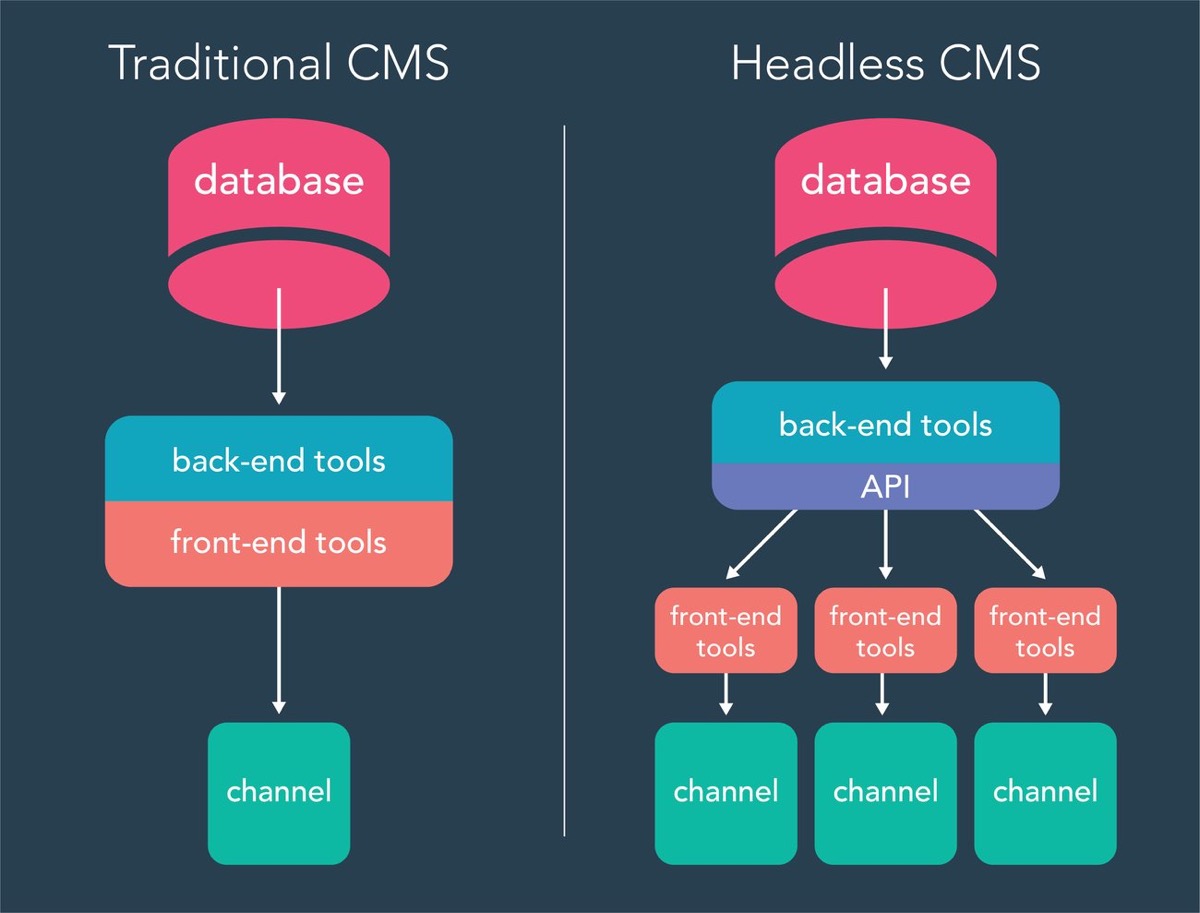
The appeal is real. JavaScript frameworks can deliver sub-second page loads, support server-side rendering and static generation, and give developers modern tooling (TypeScript, component libraries, hot reloading). But the tradeoff list is long: no native WordPress preview, broken plugin compatibility, higher hosting costs, and a team that needs to maintain two systems instead of one.
Before committing to headless, understand the full spectrum of options. Most developers asking “should I go headless?” actually need something between traditional WordPress and full headless. That middle ground is where the interesting decisions live.
Approach 1: Traditional WordPress
Traditional WordPress is the monolithic architecture: PHP themes render pages server-side, the admin dashboard and the frontend live on the same server, and everything runs through WordPress’s template hierarchy. Themes like GeneratePress, Kadence, and Astra keep the frontend lean without page builder overhead.
When Traditional Wins
- Full plugin ecosystem: every WordPress plugin works out of the box
- Native WYSIWYG editing and real-time preview
- Single hosting environment, single deployment
- Non-technical editors can manage content independently
- SEO tools like Yoast and Rank Math work natively
- Cheapest to host and maintain
When Traditional Falls Short
- PHP templating limits what you can build visually without page builders
- Page builders like Elementor generate bloated HTML (300-400+ DOM elements per page)
- Performance ceiling on complex sites without aggressive caching
- Limited to web-only delivery (no native app or IoT feeds)
Best for: Content-focused sites, blogs, small business websites, teams without JavaScript expertise, and projects where speed-to-launch matters more than architectural flexibility. If you are starting a WordPress site from scratch, our VPS deployment guide with GitHub Actions covers the infrastructure side.
Approach 2: Custom-Code Builders (Bricks, Oxygen, Breakdance)

This is the approach most “should I go headless?” conversations should land on. Builders like Bricks, Oxygen, and Breakdance sit between traditional WordPress themes and headless architecture. They generate clean, semantic HTML instead of the bloated markup that Elementor and WPBakery produce. And they let you write custom PHP, JavaScript, CSS, and HTML directly inside the builder.
How It Works
Bricks is a WordPress theme (not a plugin) that replaces the default template system with a visual builder. The key difference from Elementor: Bricks outputs 75-100 DOM elements on a typical page. Elementor outputs 300-400+ for the same design. That difference shows up directly in Core Web Vitals scores and page load times.
Where it gets interesting for developers: Bricks supports custom PHP execution inside any element. You can build dynamic query loops visually using the Query Loop Builder, or drop in raw PHP when you need complex logic. JavaScript and CSS are first-class citizens. The code execution feature (enabled per user in settings) gives you full template control without leaving the builder interface.
Why Developers Choose This Over Headless
- Same WordPress ecosystem: every plugin works, preview works, Yoast works, WooCommerce works
- Clean code output: semantic HTML, class-based styling instead of inline, intelligent asset loading (scripts only load on pages that use them)
- Full custom code access: PHP, JavaScript, CSS, and HTML anywhere in the builder. Custom elements extend the Bricks\Element class like WordPress widgets
- Single environment: one server, one deployment, one codebase. No API layer, no separate frontend hosting
- Native preview and editing: content editors see exactly what visitors see without custom preview infrastructure
The Tradeoff
Bricks sites perform well and give developers control, but they require a developer to maintain. Non-technical editors can accidentally break layouts. The learning curve is steeper than Elementor. And you are still serving PHP-rendered pages, which means you cannot match the raw speed of a statically generated Next.js or Astro site on a CDN. That said, with object caching and a good host, the difference is measured in tens of milliseconds rather than seconds.
Best for: Developers and agencies who want modern performance without leaving WordPress. Teams that need plugin compatibility and native editing. Projects where a single developer or small team manages both design and code. If you use custom post types for structured content, Bricks Query Loops make displaying them straightforward.
Approach 3: Hybrid Headless
Hybrid headless is the compromise architecture. Instead of decoupling everything, you selectively decouple only the parts of your site that need it. The homepage and high-traffic landing pages run on a JavaScript framework (Next.js, Astro, Nuxt) for maximum speed. The blog, admin panel, and content management stay on traditional WordPress. Both sides share the same content through the REST API or WPGraphQL.
How It Works
The WordPress dashboard stays unchanged. Editors create posts, manage media, and organize content exactly as before. A JavaScript frontend consumes that content via API for the decoupled pages. Incremental Static Regeneration (ISR) in Next.js automatically rebuilds individual pages when content changes without requiring a full site rebuild.
Popular 2026 stacks for hybrid:
- WordPress + Next.js + WPGraphQL: the most adopted stack. Strong community, lots of starter templates, Vercel deployment
- WordPress + Astro + REST API: zero JavaScript by default, ideal for content-heavy sites where interactivity is minimal
- WordPress + Nuxt + WPGraphQL: for teams already in the Vue.js ecosystem
Real-World Results
A mid-sized e-commerce brand that moved their storefront to hybrid headless saw Core Web Vitals improve from “Poor” to “Good,” a 34% organic traffic increase, and a 22% improvement in mobile conversion rate. A B2B SaaS company reduced average page load from 4.2 seconds to 0.8 seconds with an 18% bounce rate reduction. These gains are real but they come with real costs.
The Costs
- $3,000-15,000 upfront development for small-to-medium implementations
- $500-1,500/month ongoing maintenance retainer
- Developers must manage two environments (WordPress + frontend framework)
- Custom preview solution needed since native WordPress preview breaks
- Many plugins assume WordPress renders the frontend and stop working
- 6-12 week timeline for focused implementation
Best for: Sites where performance directly impacts revenue (e-commerce, SaaS, lead generation). Teams with both WordPress and JavaScript developers. Organizations that publish frequently and need editorial continuity alongside modern performance. If you are evaluating hosting for a hybrid setup, our Cloudways vs Kinsta comparison covers both traditional and headless-compatible options.
Approach 4: Full Headless WordPress
Full headless means WordPress serves zero HTML to visitors. It exists only as a content management API. The entire frontend is a separate application deployed independently, typically on Vercel, Netlify, or Cloudflare Pages. Every page, every template, every interaction is built in JavaScript.
What You Gain
- Complete frontend freedom: any JavaScript framework, any rendering strategy (SSR, SSG, ISR), any deployment target
- Multi-channel delivery: the same WordPress content powers your website, mobile app, smart displays, and third-party integrations through a single API
- Frontend and backend scale independently
- Reduced attack surface since the WordPress instance is not publicly accessible
- Modern developer tooling: TypeScript, component libraries, hot module replacement
What You Lose
- WYSIWYG editing, real-time preview, and in-context editing all break and require significant engineering to rebuild
- Most WordPress plugins stop working or need custom API integrations
- SEO tools (Yoast, Rank Math) need reimplementation on the frontend
- Analytics, forms, comments, and search require third-party services or custom builds
- Two hosting environments, two deployment pipelines, two sets of infrastructure to monitor
- Higher ongoing maintenance cost and engineering overhead
Headless is not automatically faster. A well-optimized traditional WordPress site with object caching can match headless page loads for standard content pages. The performance gap only becomes meaningful on complex, high-traffic sites where static generation and CDN-edge delivery provide measurable advantages.
Best for: Multi-channel content delivery across web, mobile, and IoT. Organizations with dedicated frontend engineering teams. High-traffic sites where independent scaling matters. Projects where WordPress is the CMS but the product is not a website (apps, dashboards, kiosks).
REST API vs WPGraphQL
If you choose hybrid or full headless, you need to decide how your frontend talks to WordPress.
| Feature | REST API | WPGraphQL |
|---|---|---|
| Setup | Built into WordPress since 4.7. No plugin required | Requires the WPGraphQL plugin |
| Data fetching | Fixed endpoints return full objects. Multiple requests for related data | Single query returns exactly the fields you request, including nested relationships |
| Over-fetching | Common. A post endpoint returns every field even if you only need the title | Eliminated. You specify exactly what you need |
| Performance | Multiple round trips for complex pages | Single request using the DataLoader pattern to batch-load resources |
| Schema | Loosely typed. “Hints” a schema but does not enforce it | Strictly typed. Enables autocomplete, validation, and tools like GraphiQL Explorer |
| Learning curve | Familiar to anyone who has used a REST API | Requires learning GraphQL query syntax |
| Best for | Simple projects, rapid prototyping, apps needing a few endpoints | Complex projects, content-heavy sites, enterprise-grade builds |
For a blog or simple site pulling posts and pages, the REST API is fine and requires zero extra setup. For anything with custom post types, advanced custom fields, related content, or complex taxonomies, WPGraphQL saves significant frontend code by letting you get everything in one query. If you are already using custom post types, WPGraphQL exposes them automatically once configured.
How to Choose: The Decision Framework
| If your situation is… | Choose this approach |
|---|---|
| Small-to-medium site, no JavaScript expertise, budget-conscious | Traditional WordPress |
| Developer/agency wanting modern performance without leaving WP | Custom-code builder (Bricks, Oxygen, Breakdance) |
| Performance-critical pages + editorial team that needs the WP admin | Hybrid headless |
| Multi-channel delivery, dedicated frontend engineers, enterprise budget | Full headless |
| Current site is slow but team is non-technical | Traditional + better hosting (not headless) |
| Freelancer building client sites that clients will edit | Custom-code builder (clients keep native WP editing) |
| E-commerce where page speed directly affects conversion | Hybrid headless (decouple storefront, keep WP for content) |
| Content site that needs to power a mobile app too | Full headless (API serves both web and app) |
The most common mistake is choosing headless because it sounds modern and fast, then discovering six months later that the team cannot maintain it. If your performance problems can be solved with better hosting, caching, and a clean theme or builder, that is the better path. Go headless only when the architectural separation genuinely solves a problem you have today.
Hosting Considerations
Traditional and Bricks: Standard WordPress hosting. Managed hosts like Kinsta or Cloudways handle caching, CDN, and server optimization. ScalaHosting offers managed VPS plans with their own SPanel control panel if you want more control without managing raw server configs. This is the simplest and cheapest hosting model. For comparisons, see our Cloudways vs Kinsta guide and ScalaHosting review.
Hybrid and full headless: You need two hosting environments. WordPress runs on any standard host. The frontend deploys to Vercel, Netlify, or Cloudflare Pages for edge delivery and static generation. This doubles your infrastructure footprint but puts your frontend on a global CDN. If you are running your own VPS, our guide on hosting multiple WordPress sites on one server covers the backend side.
Frequently Asked Questions
Is headless WordPress faster than traditional WordPress?
Not automatically. A well-optimized traditional WordPress site with object caching and a CDN can match headless page loads for standard content. Headless gains come from static generation and edge delivery on high-traffic, complex sites. For most blogs and business sites, better hosting solves performance issues faster and cheaper than going headless.
Does Bricks Builder work with WooCommerce?
Yes. Bricks has native WooCommerce integration and you can use its Query Loop Builder to display products, build custom shop layouts, and add conditional logic. All WooCommerce plugins work normally since Bricks runs within the WordPress ecosystem.
Can I use headless WordPress with Yoast SEO?
Yoast’s meta data is accessible through the REST API and WPGraphQL, but you need to implement it on the frontend yourself. The Yoast plugin won’t generate your meta tags, sitemap, or structured data automatically in a headless setup. You need to read the data via API and render it in your JavaScript framework’s head management.
What is WPGraphQL and do I need it?
WPGraphQL is a WordPress plugin that adds a GraphQL API alongside the built-in REST API. It lets you request exactly the data you need in a single query instead of making multiple REST calls. You need it if your headless frontend fetches complex, related content (posts with categories, custom fields, and author data). For simple setups pulling basic posts, the REST API works fine without it.
Is Bricks Builder better than Elementor?
For developers, yes. Bricks outputs 75-100 DOM elements where Elementor produces 300-400+ for the same design. Bricks supports custom PHP execution, class-based styling, and intelligent asset loading. Elementor is easier for non-technical users and has a larger third-party ecosystem. The choice depends on whether your team writes code or uses drag-and-drop exclusively.
Summary
Full headless WordPress solves a real problem for multi-channel content delivery and enterprise-scale sites. For everyone else, the custom-code builder approach (Bricks, Oxygen, Breakdance) delivers modern performance while keeping everything inside WordPress. You get clean HTML output, custom PHP and JavaScript access, native preview, full plugin compatibility, and a single deployment environment. Hybrid headless sits between the two when you need to decouple specific high-performance pages but want to keep the WordPress admin intact for editors. Traditional WordPress with a lightweight theme and good hosting still outperforms most over-engineered headless setups for content-focused sites. Choose based on what your team can maintain, not what sounds most modern. For traditional WordPress setups that need better performance without going headless, the Transients API caches expensive queries at the PHP level.