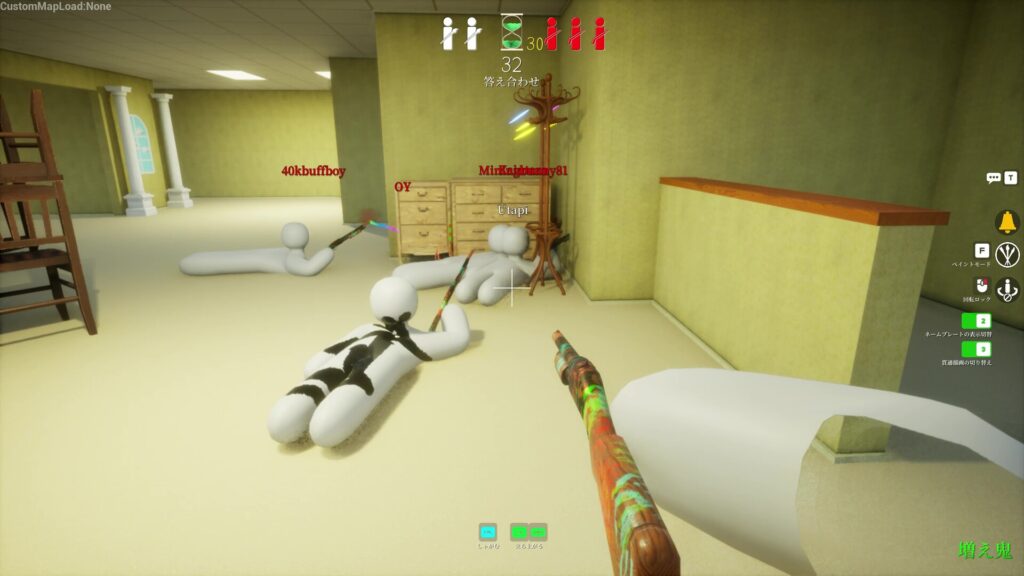
The Meccha Chameleon answer check is the moment everyone waits for: the post-round reveal that shows where every hider was tucked away, what color they painted, and which spots the seeker walked right past. It is the funniest part of a match and the most useful, because it tells you exactly why your disguise survived or fell apart. Most of what decides that outcome happens earlier, in the paint menu, where the color picker and eyedropper let you copy a surface instead of guessing at it.
This guide covers the full color-matching loop in one place: how to sample a color with the eyedropper, how the HSV, metallic, and roughness sliders fine-tune the match, why the dropper sometimes grabs the wrong shade, and what the answer check and Missed Spot Ranking are actually telling you afterward. For the wider control scheme, our controls and keybinds guide has the full list.
Key Takeaways
- Answer check: the end-of-round reveal that shows every hider’s final position, paint color, and pose, plus the spots the seeker missed.
- How to sample a color: open paint mode with F, aim at the surface you are hiding against, and press Spacebar to copy its exact color with the eyedropper.
- Fine-tune the match: use the HSV sliders for shadow and highlight, then set metallic and roughness so a glossy body does not shine against a matte wall.
- Wrong color from the dropper? Lighting throws it off. Sampling with Spacebar is the most accurate method, and nudging brightness fixes most mismatches.
- Missed Spot Ranking: added in v1.2.0, it ranks overlooked spots by how long and how close a hider stayed in the seeker’s line of sight. Treat it as a direction, not a score.
- What Is the Answer Check in Meccha Chameleon?
- Answer Check Time: What to Watch
- The Missed Spot Ranking Explained
- The Color Picker and Eyedropper
- Why the Eyedropper Picks the Wrong Color
- Color Matching Tips That Beat the Answer Check
- Frequently Asked Questions
- Gear for Color Matching in Meccha Chameleon
- Summary
What Is the Answer Check in Meccha Chameleon?
The answer check in Meccha Chameleon is the post-round reveal that runs once the seeking phase ends. It shows where each hider was positioned, the paint color they used, and whether their outline and pose still read as natural from the seeker’s angle. It is not a passive scoreboard pause. It is the fastest feedback loop in the game for learning what actually works in a room.
Both roles get something out of it. Seekers see the corners they never checked and the shapes that almost belonged but gave a hider away. Hiders find out whether their color, their spot, or their pose was the thing that broke the disguise. Because Meccha Chameleon makes the outcome of every round instantly readable, a clever hide earns a laugh and a bad one shows you the exact mistake on screen.
Answer Check Time: What to Watch
“Answer check time” is just the window the reveal stays on screen. Its length depends on the lobby and host settings rather than a fixed timer, so a private practice room can feel longer than a packed public match. Use the time as active feedback instead of waiting for the next round to load.
Three things are worth tracking during the reveal:
- Final position: where the hider committed, and how close it was to an edge, a prop, or a piece of clutter.
- Paint color: whether they matched the average wall tone or actually copied the shadow and highlight on that spot.
- Pose and outline: whether the body still looked like a shape a real object would make, since color alone rarely sells a hide.
Copy the concept, not the exact coordinates. Room layouts and seeker habits shift between matches, so a spot that survived once is a starting idea rather than a guaranteed hide. There is also a hider score that climbs while you sit in a seeker’s line of sight without being caught, which doubles as an attention clue for both sides during the round.
The Missed Spot Ranking Explained
The Missed Spot Ranking arrived in update v1.2.0 and sits inside the answer check. It lists the spots a seeker overlooked, scored by the distance and the time a hider spent inside the seeker’s line of sight. In plain terms, a hider who stood in plain view for most of the round and never got tagged ranks higher than one tucked into a back corner the seeker never reached.
The developer has not published the exact scoring formula, so treat the ranking as a directional tool rather than a precise grade. It points seekers toward the search patterns they keep missing and shows hiders which bold spots are paying off. If the list gets in the way, v1.2.1 added a toggle to show or hide it and v1.2.2 added a key to hide it.
The Color Picker and Eyedropper
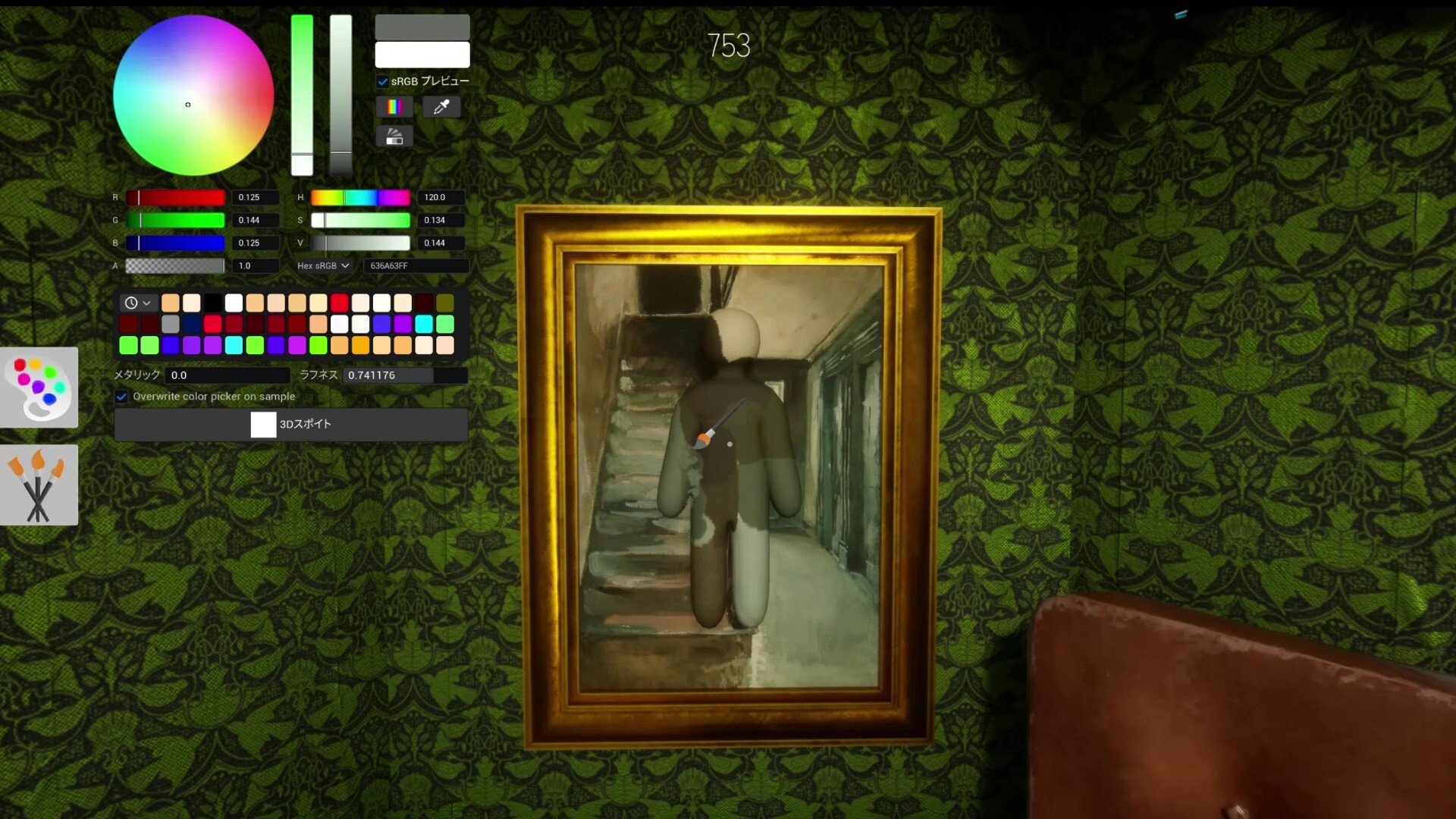
Everything the answer check reveals starts in the paint menu. Press F during the preparation phase to open it, and you get something closer to a small art program than a shooter menu: a color wheel, RGB and hex inputs, preset swatches, and sliders for metallic and roughness. The single most useful tool in that menu is the eyedropper.
How to Use the Eyedropper
The eyedropper copies a color straight off a surface so your paint matches the wall, floor, or prop instead of an eyeballed guess from the wheel. The workflow is quick once it is muscle memory:
- Reach your hiding spot during the early part of the prep timer, before you open paint.
- Press F to open paint mode and hold the camera still.
- Aim the reticle at the exact surface you will lean against and press Spacebar to sample its color.
- Hold left click and drag across the large areas of your body to lay the base color down.
- Use the scroll wheel to shrink the brush and pick up detail colors, like the grout lines between bricks, then middle-mouse to rotate and paint every angle.
Watch the “Until Search Starts” timer at the top of the screen rather than assuming a default. Casual rounds often give around 90 seconds of paint time, but hosts can set it higher or lower, so reach the spot first and paint second. Standing in the open with the paint UI up is how you burn the clock and get caught half-finished.
HSV, Metallic, and Roughness Sliders
A clean sample is the start, not the finish. The HSV sliders let you nudge lightness and saturation to match a shadowed corner or a brightly lit wall, and skilled hiders use them to paint in fake highlights and depth so a flat body reads as a contoured surface.
The metallic and roughness sliders matter just as much, and they are the ones most players ignore. They control how your body catches light. A perfect color on a glossy body still shines wrong against a matte wall, and that mismatched sheen is a common reason a “perfect” hide gets spotted the moment a seeker pans the camera past it. Match the finish of the surface, not only its color.
Why the Eyedropper Picks the Wrong Color
If the eyedropper grabs a shade that looks nothing like the surface, you are not imagining it. Players have reported hovering over a green lobby wall and pulling red, or sampling blue lockers and getting brown. The cause is lighting: the tool reads the lit appearance of a surface, and dynamic shadows and highlights can pull the sample away from the base color you expected.
A few fixes clear up most cases:
- Sample with Spacebar: players report the keybind dropper reads more accurately than other sampling methods.
- Nudge the brightness: if the pulled color sits too dark or too light, correct it with the brightness and HSV sliders instead of re-sampling repeatedly.
- Reset your resolution: if the screen resolution shifted inside a lobby, close the game, return to the main menu, reapply your resolution, and relaunch.
- Rejoin the lobby: dropper accuracy that drifts after several matches usually resets by leaving and rejoining.
Sample the surface you will actually lean on, not a similar-looking one across the room. Lighting shifts color more than you would expect, and a wall that looks identical from the doorway can read a full shade off once you are pressed against it.
Color Matching Tips That Beat the Answer Check
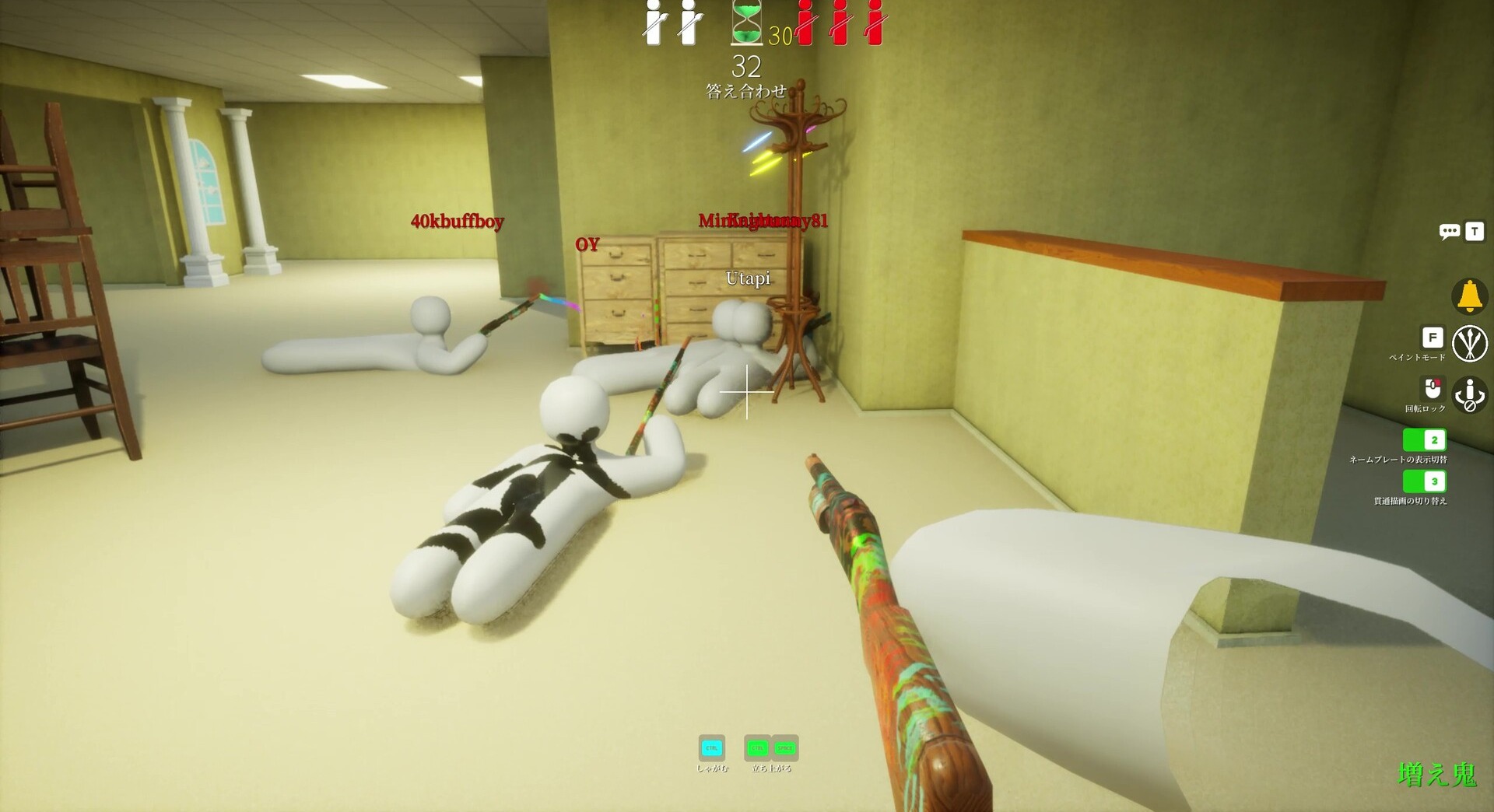
The hides that win the answer check rarely come down to a single perfect color. They come from the order you do things in and the details most players skip.
Do This
- Pick the hiding spot first, then paint toward the light and texture of that exact area.
- Sample shadow and highlight separately, not just the average wall tone.
- Match metallic and roughness so your sheen fits the surface.
- Use the see-through drawing view (default key 3) to check your body for unpainted white gaps.
- Stop moving once the disguise is set, since motion breaks a working blend faster than a slight color mismatch.
Avoid This
- Spending the whole prep timer on color while your pose still looks like a player.
- Hiding on a flat, single-color wall where any small mistake stands out.
- Trusting one eyedropper sample without checking it from the seeker’s angle.
- Forcing the body so far into geometry that the “too buried” warning appears.
- Picking the first obvious corner that experienced seekers sweep immediately.
Before the hunt starts, rotate the camera with the middle mouse button and inspect your disguise from where a seeker would approach. That single pass catches the white elbow gaps, the glossy patch on a matte surface, and the shadow pointing the wrong way that the answer check would otherwise expose for everyone to laugh at. For more on reading rooms and round flow, our Meccha Chameleon tips guide covers hider and seeker play in depth, and the game modes guide explains how lobby settings change each round.
Frequently Asked Questions
What is the answer check in Meccha Chameleon?
The answer check is the post-round reveal that plays after the seeking phase ends. It shows where every hider was hiding, the paint color and pose they used, and the spots the seeker missed, so both sides can learn what worked.
How do you use the color picker and eyedropper?
Press F to open paint mode, aim your reticle at the surface you are hiding against, and press Spacebar to sample its exact color with the eyedropper. Then hold left click to paint, use the scroll wheel to resize the brush, and middle mouse to rotate your body.
Why does the Meccha Chameleon eyedropper pick the wrong color?
Dynamic lighting throws it off. The dropper reads the lit appearance of a surface, so shadows and highlights can pull the sample away from the base color. Sampling with Spacebar is the most accurate method, and nudging the brightness or HSV sliders fixes most mismatches.
What is the Missed Spot Ranking?
Added in update v1.2.0, the Missed Spot Ranking lists the spots a seeker overlooked, scored by how close and how long a hider stayed in the seeker’s line of sight. The exact formula is not published, so treat it as a directional tool rather than a precise score.
What do the metallic and roughness sliders do?
They control how your body catches light. Matching them to the surface stops a glossy body from shining against a matte wall, which is one of the most common reasons a well-colored hide still gets spotted.
How long is answer check time in Meccha Chameleon?
The reveal length depends on lobby and host settings rather than a fixed timer, so private rooms can run longer than public matches. Use the time to study hider positions, paint colors, and poses before the next round loads.
Gear for Color Matching in Meccha Chameleon
Color matching lives and dies on what you can see and how precisely you can aim the eyedropper. A panel with accurate color, a steady pointing device, and a tablet for fine brush work all make the paint phase less of a fight. These three are a solid starting kit, and prices are accurate as of June 2026.

KOORUI 24″ QHD IPS Monitor
An IPS panel shows truer color than a cheap TN screen, so the wall you sample looks like the wall you paint.
Glorious Model D- (Minus)
A light, accurate mouse keeps the reticle from jittering when you line up an eyedropper sample.

Wacom Intuos Wireless
A pen tablet makes the small detail brushwork, like grout lines and edges, far easier than a mouse.
Between gaming sessions, Berry Finds tracks real-time Amazon deals on thousands of everyday products across home, kitchen, beauty, and more so you never overpay on the stuff you buy regularly.
Summary
The answer check is where Meccha Chameleon shows its hand, but the round is won earlier, in the paint menu. Sample the surface you are hiding against with the Spacebar eyedropper, fine-tune with the HSV sliders, and set metallic and roughness so your sheen matches the wall. When the dropper reads wrong, blame the lighting and nudge brightness rather than re-sampling forever.
Then let the answer check teach you. Watch the spots the Missed Spot Ranking surfaces, copy the concept rather than the coordinates, and check your disguise from the seeker’s angle before the hunt begins. For the full key list behind all of this, keep our controls and keybinds guide open on a second screen.