Godot 4 multiplayer runs on four building blocks: a network peer to connect machines, MultiplayerSpawner to replicate nodes, MultiplayerSynchronizer to keep properties in sync, and the @rpc annotation to call functions across the network. Wire those four together and two players can share a world in an afternoon. The engine can carry it a long way too. Sir, We Have an Orc Problem, this week’s Steam breakout, pushes 100,000 physics-driven entities through a Godot build.
This tutorial walks the full path: host and join, spawn players, sync movement, call RPCs, and keep the server in charge. It continues our 2D game arc, so the player scene from the platformer controller guide drops straight in, and the signals guide covers the event plumbing this one builds on. All code targets current Godot 4.x (4.7 is stable as of July 2026) and is verified against the official docs.
Key Takeaways
- Four pieces do everything: ENetMultiplayerPeer connects machines, MultiplayerSpawner replicates nodes, MultiplayerSynchronizer syncs properties, and @rpc calls functions across the network.
- The server owns the truth: peer ID 1 is the host and the default authority for every node. Clients send input; the server decides outcomes.
- Name nodes by peer ID: spawn each player as
str(peer_id)and callset_multiplayer_authority(name.to_int())so every machine agrees on who controls what. - RPCs for events, Synchronizer for state: a synchronizer catches up late joiners automatically; an RPC fires once and is gone.
- Node paths must match: pass
trueas the second argument ofadd_child()for networked nodes, or peers stop agreeing on where things live.
- Prerequisites
- How Godot 4 Multiplayer Works
- Step 1: Host and Join With ENetMultiplayerPeer
- Step 2: Spawn Players With MultiplayerSpawner
- Step 3: Sync State With MultiplayerSynchronizer
- Step 4: Call Across the Network With @rpc
- Step 5: Keep the Server Authoritative
- Common Pitfalls and Fixes
- Gear for Game Dev Sessions
- Frequently Asked Questions
- Summary
Prerequisites
- Godot 4.x: any recent 4.x release works; 4.7.1 is the current stable as of July 2026. Godot 3 networking is a different API, and its patterns will not compile here.
- A playable scene: any project with a player scene works. We use the CharacterBody2D player from our platformer arc.
- GDScript basics: comfortable with signals and scene instancing. Our Godot 4 signals guide covers everything this tutorial assumes.
How Godot 4 Multiplayer Works
Godot 4 multiplayer is a high-level API built into every node. Each running game connects through a peer object, one machine acts as the server, and everyone gets a unique peer ID. The server is always ID 1, and by default it holds authority over every node, meaning its version of the game is the truth everyone else receives.
You pick a transport based on where the game runs:
| Peer Type | Transport | Web Export | Use It For |
|---|---|---|---|
| ENetMultiplayerPeer | UDP | No | Desktop games, lowest latency |
| WebSocketMultiplayerPeer | TCP | Yes | Browser games through a server |
| WebRTCMultiplayerPeer | UDP data channels | Yes | Low-latency or peer-to-peer web |
This guide uses ENet, the standard choice for desktop. The architecture rule that keeps everything sane: clients send input, the server decides outcomes. Hold onto that; it shapes every step below.
Step 1: Host and Join With ENetMultiplayerPeer
Hosting and joining are a few lines each. Put this in a lobby script with two buttons:
const PORT := 9999
const MAX_CLIENTS := 8

func _on_host_pressed() -> void:
	var peer := ENetMultiplayerPeer.new()
	peer.create_server(PORT, MAX_CLIENTS)
	multiplayer.multiplayer_peer = peer

func _on_join_pressed() -> void:
	var peer := ENetMultiplayerPeer.new()
	peer.create_client("127.0.0.1", PORT)
	multiplayer.multiplayer_peer = peer
The address 127.0.0.1 connects to your own machine for testing. On a home network, replace it with the host’s local IP. The multiplayer property is available on every node, so assigning the peer once makes the whole scene tree network-aware.
React to connections with the built-in signals:
func _ready() -> void:
	multiplayer.peer_connected.connect(_on_peer_connected)
	multiplayer.peer_disconnected.connect(_on_peer_disconnected)
	multiplayer.connected_to_server.connect(_on_connected)   # clients only
	multiplayer.connection_failed.connect(_on_failed)        # clients only
	multiplayer.server_disconnected.connect(_on_server_gone) # clients only
To leave a session cleanly, replace the peer: multiplayer.multiplayer_peer = OfflineMultiplayerPeer.new(). That resets the API to single-player behavior instead of leaving a dead connection around.
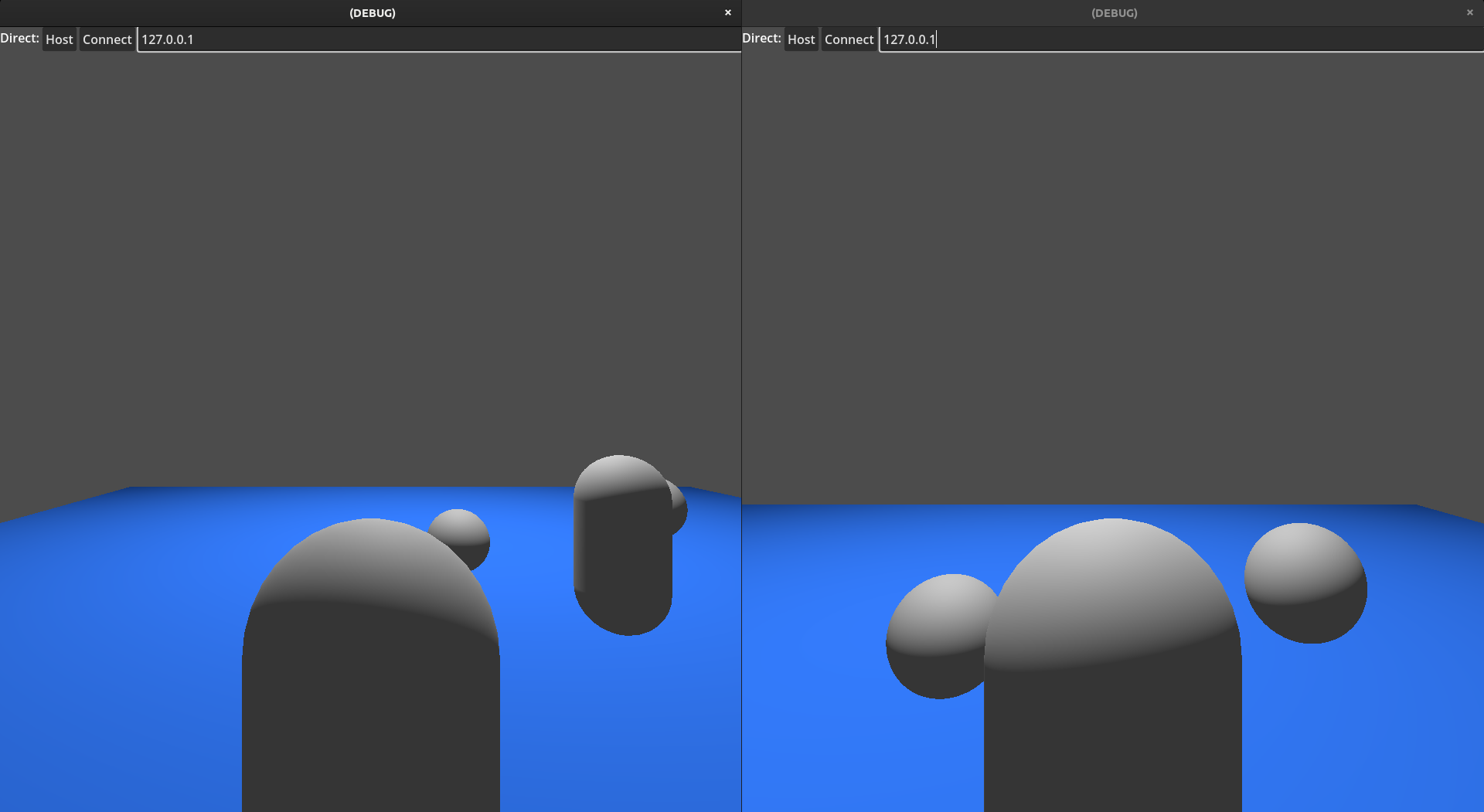
⚡ Quick tip: In the editor, set Debug > Run Multiple Instances to 2, then press play once. You get a host window and a client window instantly, no exports needed.
Step 2: Spawn Players With MultiplayerSpawner
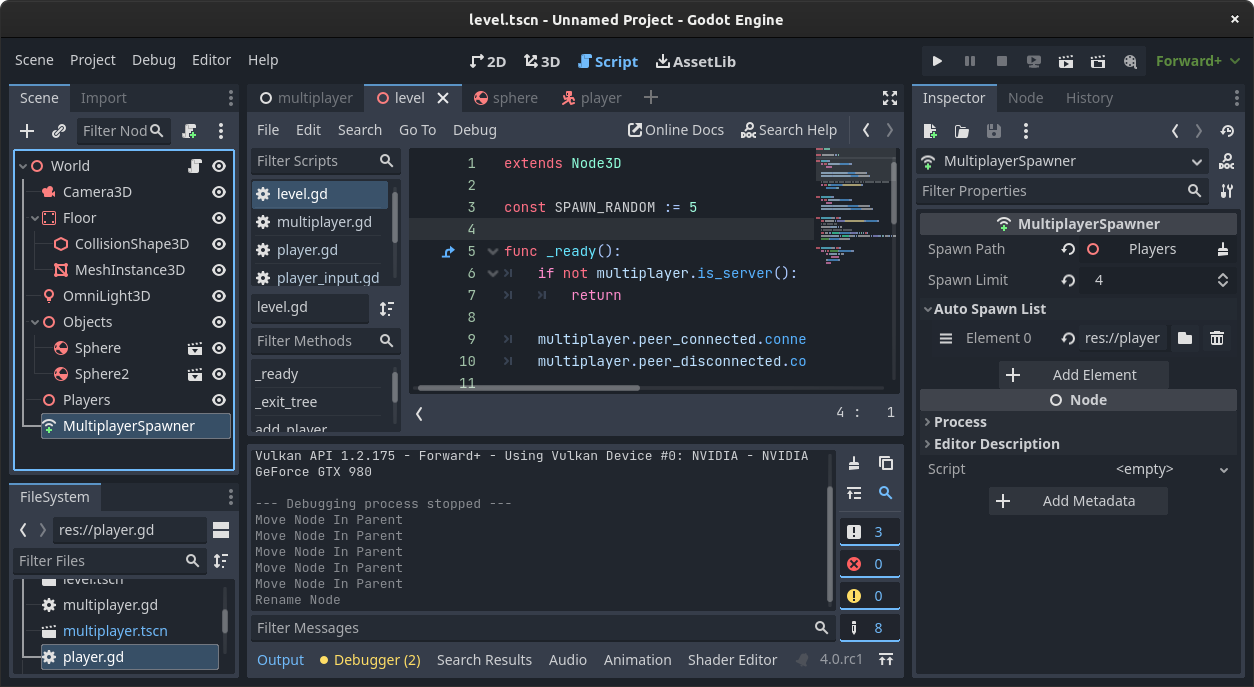
MultiplayerSpawner replicates node creation. When the authority adds a registered scene as a child of the spawn root, the same node appears on every connected peer, including players who join later. Set it up in three moves:
- Add a plain Node named
Playersto your main scene as the container. - Add a
MultiplayerSpawnerand set its Spawn Path to thePlayersnode. - Add your player scene to the spawner’s Auto Spawn List.
Then the server, and only the server, creates a player per peer:
const PLAYER_SCENE := preload("res://player.tscn")

func _ready() -> void:
	if multiplayer.is_server():
		multiplayer.peer_connected.connect(_add_player)
		multiplayer.peer_disconnected.connect(_remove_player)
		_add_player(1)   # the host needs a body too

func _add_player(id: int) -> void:
	var player := PLAYER_SCENE.instantiate()
	player.name = str(id)
	$Players.add_child(player, true)

func _remove_player(id: int) -> void:
	var player := $Players.get_node_or_null(str(id))
	if player:
		player.queue_free()
Two details in that snippet carry the whole system. Naming the node str(id) bakes the owning peer’s ID into the node itself, which Step 5 uses for authority. And the true in add_child(player, true) forces a human-readable name. Networked nodes are matched by path across machines, and auto-generated names like @Node@2 break that matching.
For anything beyond scene instancing, assign the spawner’s spawn_function to a Callable that builds and returns a node from custom data, then trigger it with spawn(data). The spawner adds the node to the tree on every peer for you, late joiners included.
Step 3: Sync State With MultiplayerSynchronizer
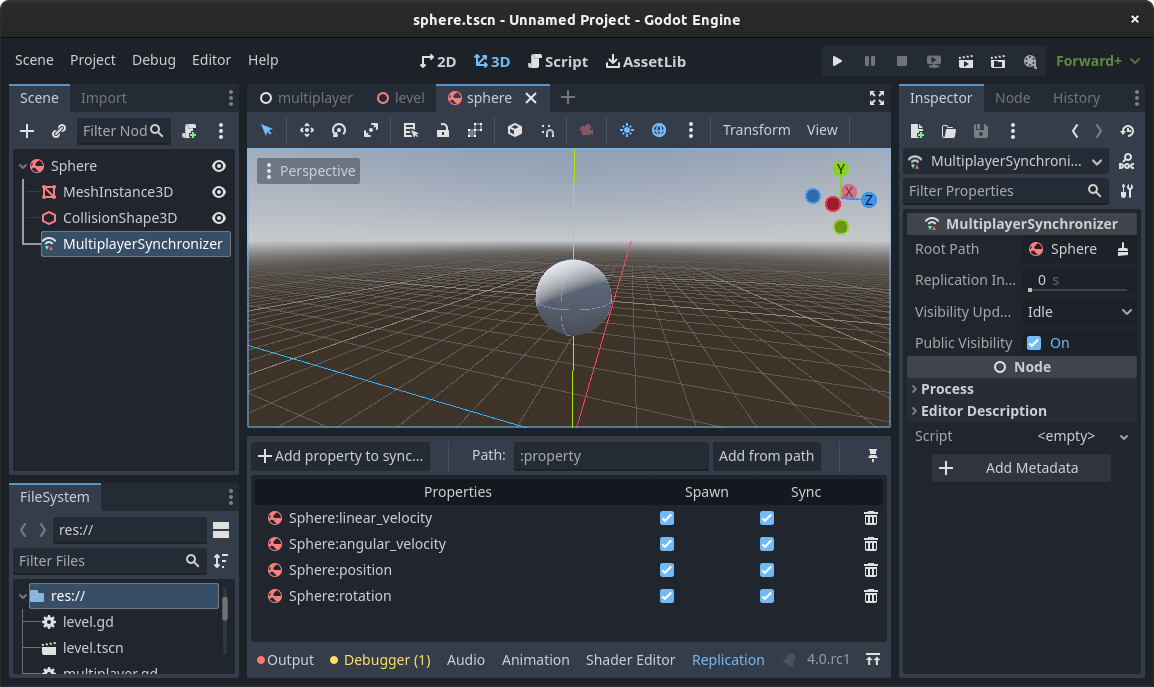
MultiplayerSynchronizer continuously copies chosen properties from the node’s authority to everyone else. Add one as a child of your player scene, and a Replication panel appears at the bottom of the editor. Click Add Property to Sync and pick what matters, usually position to start.
Each property row has two toggles worth understanding:
- Spawn: the value is sent once when the node appears on a remote peer. Use it for setup state like a player’s color or loadout.
- Sync: the value is sent continuously. In always mode, the send rate is controlled by
replication_interval; the on-change mode usesdelta_intervaland only transmits what changed, which saves bandwidth on values that update rarely.
The synchronizer also controls who sees what. public_visibility is on by default, but set_visibility_for(peer, false) hides a node’s state from a specific peer, which is how you build fog of war or hidden-information games without hand-rolling filters.
Step 4: Call Across the Network With @rpc
Synchronizers stream state; RPCs fire events. Mark a function with the @rpc annotation and any peer that is allowed to can run it on the others:
@rpc("any_peer", "call_local", "reliable")
func send_chat(message: String) -> void:
	var sender := multiplayer.get_remote_sender_id()
	print("%s: %s" % [sender, message])

# invoke it:
send_chat.rpc("hello everyone")   # runs on all peers
send_chat.rpc_id(1, "hello host") # runs only on peer 1
The annotation takes up to four arguments:
| Option | Values | Meaning |
|---|---|---|
| Mode | “authority” (default), “any_peer” | Who may call it remotely. Authority-only blocks clients. |
| Sync | “call_remote” (default), “call_local” | Whether the caller also runs it locally. |
| Transfer | “reliable”, “unreliable”, “unreliable_ordered” | Delivery guarantee. Unreliable is fine for state that gets overwritten anyway. |
| Channel | integer, default 0 | Separate lanes so a big reliable transfer cannot stall fast unreliable updates. |
Three rules the engine enforces. Every peer must have the same RPC declarations in the same script, since Godot checksums them at connection. Arguments must be serializable, so no Objects or Callables through an RPC. And inside an any_peer RPC, always read multiplayer.get_remote_sender_id() instead of trusting an ID the caller passed as an argument.
Step 5: Keep the Server Authoritative
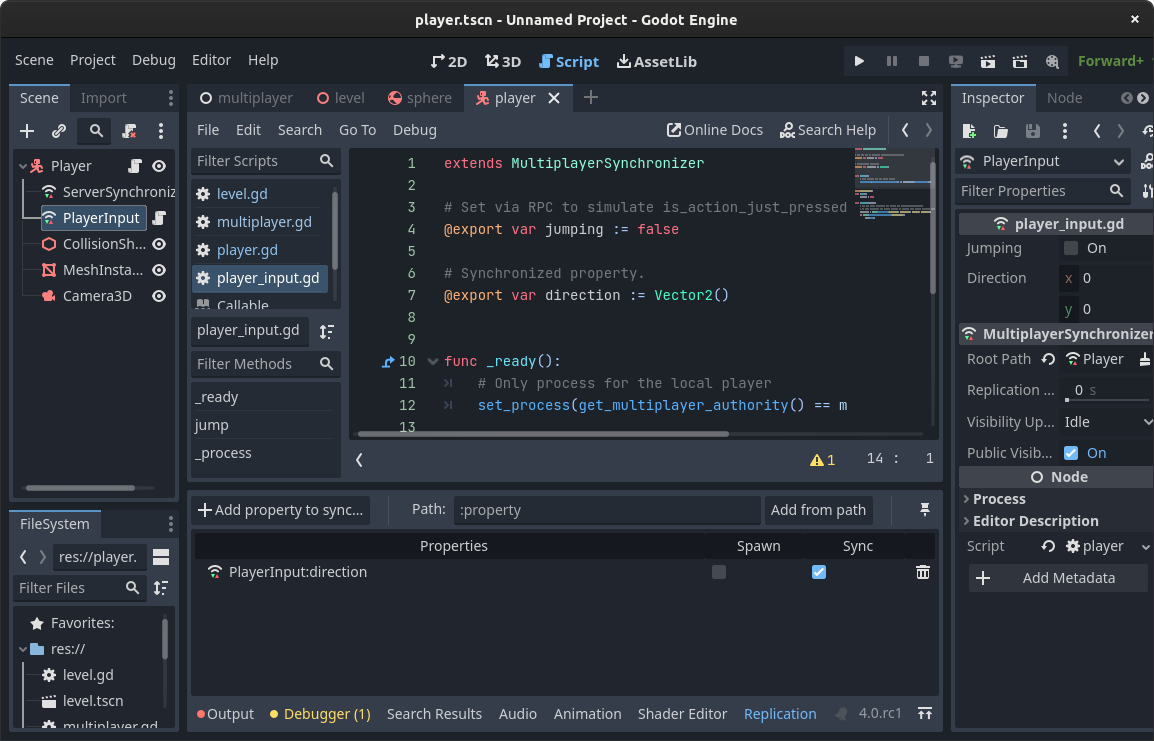
Authority decides which peer’s version of a node wins. It defaults to the server everywhere, and the trick from Step 2 pays off here: because each player node is named after its peer ID, one line in the player script hands each player control of their own body.
func _enter_tree() -> void:
	set_multiplayer_authority(name.to_int())

func _physics_process(delta: float) -> void:
	if not is_multiplayer_authority():
		return
	# input and movement code runs only on the owning peer
Setting authority in _enter_tree() matters: it runs before the child MultiplayerSynchronizer initializes, so the synchronizer knows its owner from the first frame. The is_multiplayer_authority() gate keeps every other machine from running that player’s input and physics, which is the most common source of desync.
That setup is client-authoritative movement, and it is fine for co-op. For anything competitive, move to the pattern from the official scene-replication demo: the client owns only a small input synchronizer child, the server owns the character, reads the replicated input, and runs the physics. Either way, keep the rule from the start: damage, scoring, and item logic run inside multiplayer.is_server() checks, and every client RPC is a request the server validates, never a command it obeys.
Common Pitfalls and Fixes
These are the problems that fill the Godot forums and r/godot threads, with the fixes that come up again and again:
- Remote players stutter: raw synchronizer updates arrive slower than your frame rate. The community fix is syncing to a buffer value instead of position directly, then interpolating toward the latest received value each frame. Smooth at 20 network updates a second.
- The host desyncs but clients look fine: usually physics running on every machine at once. Check the
is_multiplayer_authority()gate, and confirm authority is set in_enter_tree(), not later. - Mass spawns crawl: replicating hundreds of nodes through a spawner at once floods the connection. Developers on r/godot generating large levels found sending the generation seed or layout data through one RPC and building locally is dramatically cheaper.
- Late joiners miss everything: RPCs are fire-and-forget, so anyone who joins after the call never sees it. The working doctrine: RPCs for one-time events, synchronizers for anything a late joiner must know, since synchronizers push current state to new peers automatically.
- Old tutorials will not compile: Godot 3’s
remote,master, andpuppetkeywords are gone, andget_tree().network_peerbecamemultiplayer.multiplayer_peer. If a snippet uses those, it predates Godot 4.
Gear for Game Dev Sessions
Multiplayer testing means running two or three game instances next to the editor, which is where a machine with real memory bandwidth and fast storage earns its keep. Current deals on a dev-friendly kit, as of July 2026:

MacBook Pro 14″ M2 Pro
Compiles Godot projects and runs multiple game instances without breaking a sweat, at 25% off.

Samsung T7 Shield 2TB
Rugged, fast external storage for project backups and asset libraries that outgrow the internal drive.

LENTION 7-in-1 USB-C Hub
4K HDMI for a second monitor plus 100W passthrough, the cheap fix for a laptop-based dev desk.
Frequently Asked Questions
Does Godot 4 have built-in multiplayer?
Yes. Godot 4 ships a high-level multiplayer API on every node: network peers for connections, MultiplayerSpawner and MultiplayerSynchronizer for replication, and the @rpc annotation for remote calls. No plugins are required for LAN or client-hosted games.
What is the difference between MultiplayerSpawner and MultiplayerSynchronizer?
The spawner replicates node creation and removal, so a scene the authority adds appears on every peer. The synchronizer replicates property values on nodes that already exist, like a player’s position. Most multiplayer scenes use both together.
How do I test Godot multiplayer on one computer?
In the editor, set Debug then Run Multiple Instances to 2 or more and press play. One window hosts on 127.0.0.1 and the others join it. No exporting or second machine needed.
Can Godot 4 multiplayer work in the browser?
Not over ENet, which uses UDP and cannot run in web exports. Browser games use WebSocketMultiplayerPeer through a server or WebRTCMultiplayerPeer for peer-to-peer. The rest of the API, spawners, synchronizers, and RPCs, works the same on all three.
Why should the server be authoritative?
Anything a client controls, a modified client can fake. Keeping damage, scoring, and item logic on the server and treating client RPCs as requests to validate means a cheater can only lie about their own input, not the game state.
What Godot version do I need for this tutorial?
Any Godot 4.x release. The @rpc annotation, MultiplayerSpawner, and MultiplayerSynchronizer all arrived in 4.0, and 4.7.1 is the current stable version as of July 2026. Godot 3 uses a different networking API that is not compatible with this code.
Summary
Godot 4 multiplayer comes down to a repeatable recipe: connect with ENetMultiplayerPeer, spawn players through a MultiplayerSpawner named by peer ID, sync state with a MultiplayerSynchronizer, fire events with @rpc, and gate everything that matters behind server authority. The pitfalls list covers the rest: interpolate remote movement, keep physics on one machine, and reach for RPCs when spawner replication gets heavy.
From here, the engine-agnostic side of the problem lives in our netcode systems guide, and the rest of the Godot arc continues from the platformer controller this tutorial’s player came from.