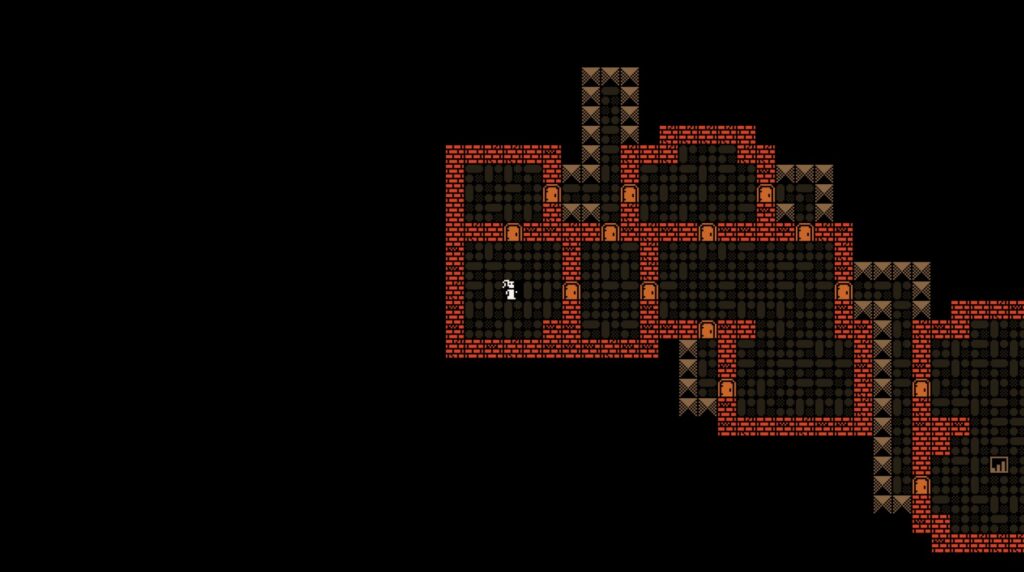
Every roguelike needs random dungeons, and Binary Space Partitioning (BSP) is the algorithm that most of them use under the hood. It guarantees connected rooms, produces natural-looking layouts, and runs fast enough to generate a new floor in a single frame. The catch is that most tutorials covering BSP in Godot are written for Godot 3 and use the deprecated TileMap node.
This tutorial walks through building a complete BSP dungeon generator in Godot 4 using GDScript and the current TileMapLayer API. By the end you will have a working system that splits space into rooms, connects them with corridors, and renders everything to a tilemap. If you have worked through our Wave Function Collapse tutorial, this is the natural next step for your procedural generation toolkit.
Key Takeaways
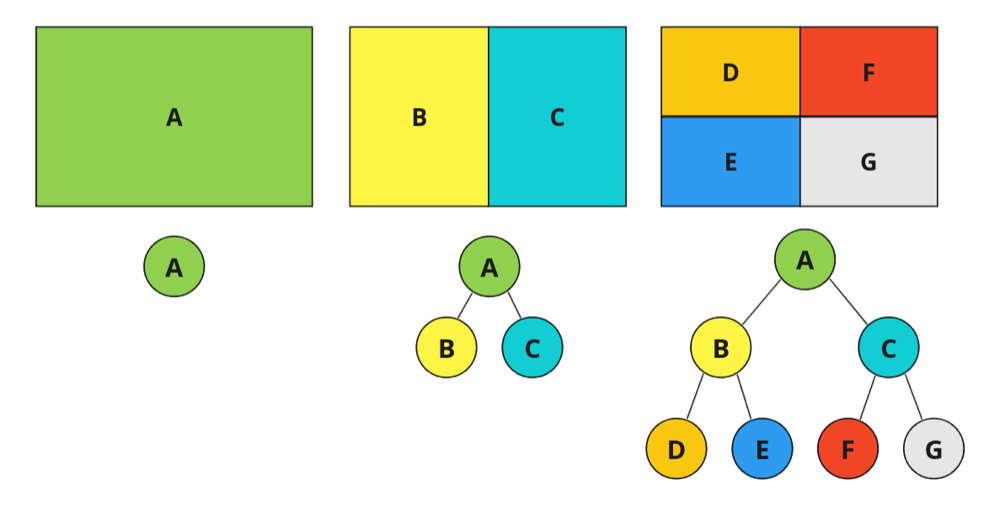
- BSP splits space recursively: a binary tree divides your map into smaller partitions, then places one room per leaf node
- Corridors connect sibling rooms: walking up the tree from leaves to root guarantees every room is reachable
- Godot 4 uses TileMapLayer: the old TileMap node is deprecated, this tutorial uses the current API
- Five parameters control everything: map size, recursion depth, split range, minimum room size, and room padding
- The full script is under 150 lines: BSP is one of the simplest procedural generation algorithms to implement
How BSP Dungeon Generation Works
BSP dungeon generation is a three-phase process. First, you recursively split a rectangular space into smaller partitions using a binary tree. Second, you place a room inside each leaf node (the partitions that were not split further). Third, you connect sibling rooms with corridors by walking back up the tree.
The binary tree structure is what makes BSP reliable. Because every split produces exactly two children, and corridors connect siblings at every level of the tree, the resulting dungeon is always fully connected. No orphaned rooms, no unreachable areas. That guarantee is why BSP is the go-to algorithm for roguelikes like Binding of Isaac, Enter the Gungeon, and countless indie projects.
Setting Up the Godot 4 Project
Create a new Godot 4 project. Your scene needs two nodes:
- A Node2D as the root (this holds the generator script)
- A TileMapLayer as a child (this renders the dungeon)
Set up a TileSet on the TileMapLayer with at least two tile types: a floor tile and a wall tile. A 16×16 pixel tile size works well for prototyping. The atlas coordinates for your floor tile will go into the generator script. For this tutorial, we use Vector2i(0, 0) for walls and Vector2i(1, 0) for floors. Adjust these to match your own tileset.
Attach a new script to the root Node2D. This is where all the generation logic lives.
Building the BSP Tree
The core data structure is a Branch class that represents one partition of space. Each branch stores its position, size, and references to two child branches (or null if it is a leaf).
Create a new script file called branch.gd:
class_name Branch

var position: Vector2i
var size: Vector2i
var left: Branch
var right: Branch
var room: Rect2i

func _init(pos: Vector2i, s: Vector2i) -> void:
    position = pos
    size = s

func is_leaf() -> bool:
    return left == null and right == null

func get_center() -> Vector2i:
    if room != Rect2i():
        return Vector2i(
            room.position.x + room.size.x / 2,
            room.position.y + room.size.y / 2
        )
    return Vector2i(position.x + size.x / 2, position.y + size.y / 2)

func get_leaves() -> Array[Branch]:
    if is_leaf():
        return [self]
    var result: Array[Branch] = []
    if left:
        result.append_array(left.get_leaves())
    if right:
        result.append_array(right.get_leaves())
    return result
The room property stores the actual room rectangle placed inside this partition. It starts empty and gets assigned during room generation. The get_center() method returns the room center if a room exists, otherwise the partition center. This is used later for corridor routing.
Recursive Splitting
The split function takes a branch and divides it into two children. The split direction depends on the aspect ratio: tall partitions split horizontally, wide partitions split vertically. The split position is randomized between 30% and 70% of the available space to avoid uniform grids.
Add this function to your main generator script:
const MIN_PARTITION_SIZE := 10

func split_branch(branch: Branch, depth: int) -> void:
    if depth <= 0 or branch.size.x < MIN_PARTITION_SIZE * 2 \
            and branch.size.y < MIN_PARTITION_SIZE * 2:
        return

    var split_h := branch.size.y >= branch.size.x
    var split_pct := randf_range(0.3, 0.7)

    if split_h:
        var split_y := int(branch.size.y * split_pct)
        branch.left = Branch.new(
            branch.position,
            Vector2i(branch.size.x, split_y)
        )
        branch.right = Branch.new(
            Vector2i(branch.position.x, branch.position.y + split_y),
            Vector2i(branch.size.x, branch.size.y - split_y)
        )
    else:
        var split_x := int(branch.size.x * split_pct)
        branch.left = Branch.new(
            branch.position,
            Vector2i(split_x, branch.size.y)
        )
        branch.right = Branch.new(
            Vector2i(branch.position.x + split_x, branch.position.y),
            Vector2i(branch.size.x - split_x, branch.size.y)
        )

    split_branch(branch.left, depth - 1)
    split_branch(branch.right, depth - 1)
A depth of 4 produces up to 16 rooms (2^4). Depth 5 gives 32. Start with 4 for testing and adjust based on your map size. The MIN_PARTITION_SIZE constant prevents partitions from becoming too small to hold a room.
Generating Rooms Inside Leaves
After the tree is built, iterate over all leaf nodes and place a room inside each one. The room is smaller than the partition, with random padding on each side to prevent rooms from touching the partition edges.
const MIN_ROOM_SIZE := 4
const ROOM_PADDING := 2

func generate_rooms(branch: Branch) -> void:
    for leaf in branch.get_leaves():
        var max_w := leaf.size.x - ROOM_PADDING * 2
        var max_h := leaf.size.y - ROOM_PADDING * 2

        if max_w < MIN_ROOM_SIZE or max_h < MIN_ROOM_SIZE:
            continue

        var w := randi_range(MIN_ROOM_SIZE, max_w)
        var h := randi_range(MIN_ROOM_SIZE, max_h)
        var x := leaf.position.x + randi_range(ROOM_PADDING, leaf.size.x - w - ROOM_PADDING)
        var y := leaf.position.y + randi_range(ROOM_PADDING, leaf.size.y - h - ROOM_PADDING)

        leaf.room = Rect2i(x, y, w, h)
The padding creates natural gaps between rooms that become wall space. If a partition is too small to fit the minimum room size with padding, it gets skipped. This occasionally produces empty partitions, which is fine. Real dungeons have dead space.
Connecting Rooms with Corridors
This is where BSP pays off. Because the tree guarantees that every non-leaf node has exactly two children, you connect rooms by walking the tree and drawing a corridor between each pair of siblings.
var corridors: Array[Array] = []

func connect_rooms(branch: Branch) -> void:
    if branch.is_leaf():
        return
    if branch.left and branch.right:
        connect_rooms(branch.left)
        connect_rooms(branch.right)

        var left_center := branch.left.get_center()
        var right_center := branch.right.get_center()
        carve_corridor(left_center, right_center)

func carve_corridor(from: Vector2i, to: Vector2i) -> void:
    var path: Array[Vector2i] = []
    var current := from

    # Move horizontally first
    while current.x != to.x:
        current.x += sign(to.x - current.x)
        path.append(current)

    # Then move vertically
    while current.y != to.y:
        current.y += sign(to.y - current.y)
        path.append(current)

    corridors.append(path)
The corridor carving uses an L-shaped path: move horizontally first, then vertically. This creates clean right-angle corridors. For more organic-looking paths, you could randomize whether horizontal or vertical movement comes first, or add random jogs along the way.
Rendering to the TileMapLayer
With rooms and corridors defined, the final step is painting them onto the TileMapLayer. Start by filling the entire map with wall tiles, then carve out floor tiles for rooms and corridors.
@export var map_size := Vector2i(60, 40)
@export var split_depth := 4
@onready var tile_layer: TileMapLayer = $TileMapLayer

const TILE_SOURCE := 0
const WALL_ATLAS := Vector2i(0, 0)
const FLOOR_ATLAS := Vector2i(1, 0)

func _ready() -> void:
    generate_dungeon()

func generate_dungeon() -> void:
    corridors.clear()

    # Fill with walls
    for x in range(map_size.x):
        for y in range(map_size.y):
            tile_layer.set_cell(Vector2i(x, y), TILE_SOURCE, WALL_ATLAS)

    # Build BSP tree
    var root := Branch.new(Vector2i.ZERO, map_size)
    split_branch(root, split_depth)

    # Place rooms
    generate_rooms(root)

    # Connect rooms
    connect_rooms(root)

    # Carve rooms into tilemap
    for leaf in root.get_leaves():
        if leaf.room != Rect2i():
            for x in range(leaf.room.position.x, leaf.room.position.x + leaf.room.size.x):
                for y in range(leaf.room.position.y, leaf.room.position.y + leaf.room.size.y):
                    tile_layer.set_cell(Vector2i(x, y), TILE_SOURCE, FLOOR_ATLAS)

    # Carve corridors into tilemap
    for path in corridors:
        for cell in path:
            tile_layer.set_cell(cell, TILE_SOURCE, FLOOR_ATLAS)
Hit Play and you should see a random dungeon every time the scene loads. The @export variables let you tweak map size and split depth from the inspector without editing code.
Tuning and Extending
The basic generator works, but real games need more refinement. Here are the parameters worth experimenting with and some extensions to consider.
Parameters That Matter
| Parameter | Effect | Starting Value |
|---|---|---|
map_size | Total dungeon dimensions in tiles | 60 x 40 |
split_depth | How many times to subdivide (2^n max rooms) | 4 |
MIN_PARTITION_SIZE | Smallest allowed partition before stopping splits | 10 |
MIN_ROOM_SIZE | Smallest room dimension | 4 |
ROOM_PADDING | Gap between room edges and partition edges | 2 |
| Split range (0.3 - 0.7) | How far off-center splits can be. Wider = more variety | 0.3 - 0.7 |
Dead-End Removal
Some corridors create short dead-end stubs. A simple cleanup pass checks each floor tile for three or more wall neighbors in cardinal directions and converts those tiles back to walls. Run this in a loop until no more changes occur:
func remove_dead_ends() -> void:
    var changed := true
    while changed:
        changed = false
        for x in range(1, map_size.x - 1):
            for y in range(1, map_size.y - 1):
                var pos := Vector2i(x, y)
                if tile_layer.get_cell_atlas_coords(pos) != FLOOR_ATLAS:
                    continue
                var walls := 0
                for dir in [Vector2i.UP, Vector2i.DOWN, Vector2i.LEFT, Vector2i.RIGHT]:
                    if tile_layer.get_cell_atlas_coords(pos + dir) == WALL_ATLAS:
                        walls += 1
                if walls >= 3:
                    tile_layer.set_cell(pos, TILE_SOURCE, WALL_ATLAS)
                    changed = true
Where to Go from Here
Once the basic structure works, you can layer on more systems: spawn points for enemies and items based on room size, locked doors between specific corridors, room type classification (treasure rooms, boss rooms, shops) based on distance from the start room, or decorative tile autotiling using Godot 4's terrain system. If you want to add AI enemies that move through these dungeons, our steering behaviors for game AI tutorial covers pathfinding and movement in Godot 4.
Recommended Dev Gear
Long coding sessions building procedural systems need a solid setup. A good mechanical keyboard, focused audio, and a controller for playtesting make the iteration loop faster. If you are still deciding on a game engine, our Godot vs Unity comparison breaks down the tradeoffs.
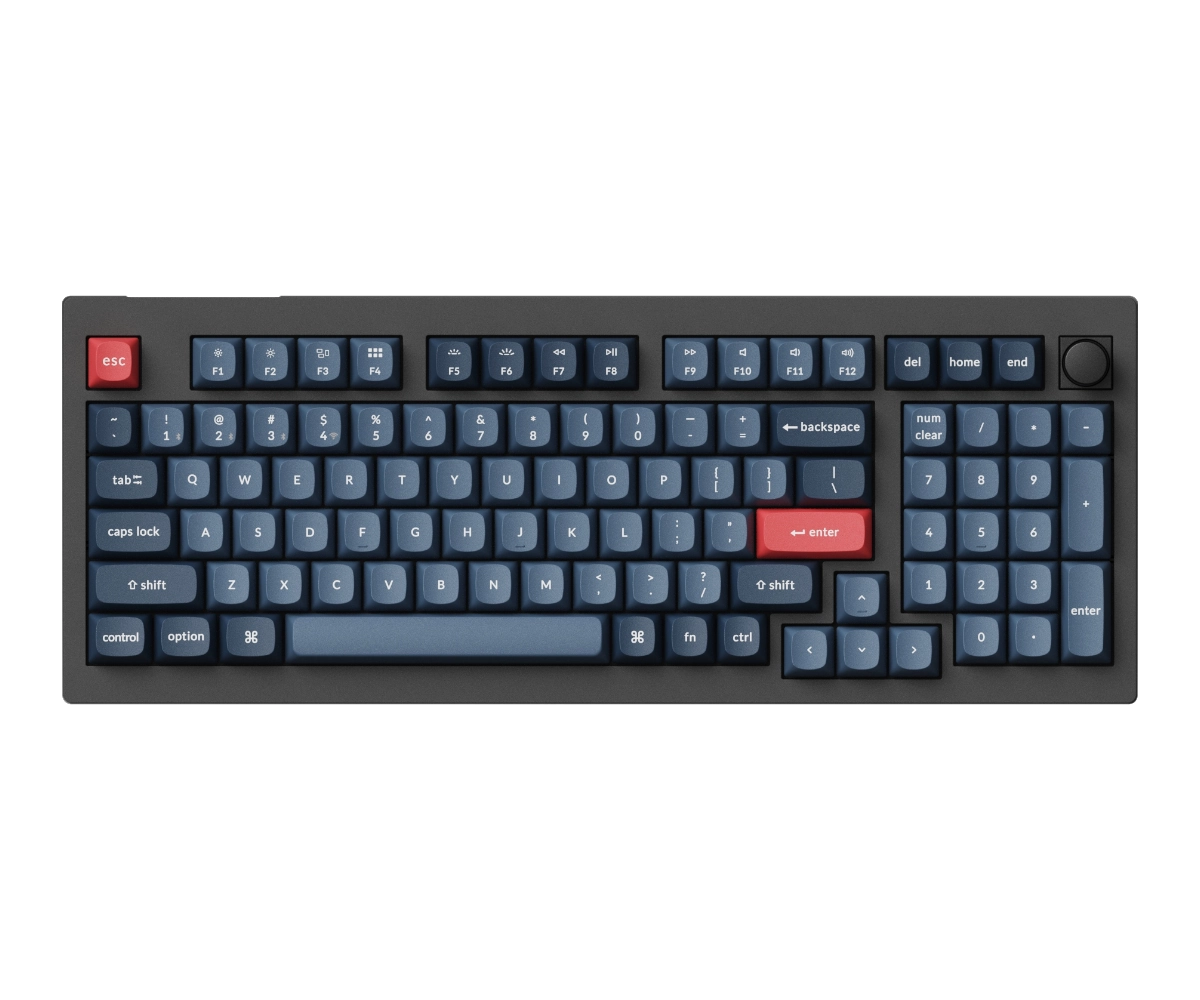
Keychron V5 Ultra
96% wireless mechanical with 8000Hz polling rate

SteelSeries Arctis Nova 1
Lightweight wired headset with noise-cancelling mic

8BitDo Ultimate 2
Wireless controller for playtesting your game builds
Frequently Asked Questions
Why use BSP instead of random room placement?
BSP guarantees that all rooms are connected through the tree structure. Random room placement requires a separate pathfinding step to ensure connectivity, and can produce clusters of overlapping rooms or isolated areas that need extra code to fix.
How many rooms can BSP generate?
The maximum number of rooms equals 2 raised to the power of your split depth. Depth 4 gives up to 16 rooms, depth 5 gives 32, and depth 6 gives 64. Some leaves may be too small for rooms, so the actual count is usually slightly less than the maximum.
Does this work with Godot 4's terrain autotiling?
Yes. After generating the floor and wall layout, you can apply terrain connections as a post-processing step. The generator places tiles by atlas coordinates, and Godot's terrain system can then handle wall-to-floor transitions automatically.
Can I use this for 3D dungeons?
The BSP algorithm works in any number of dimensions. For 3D, replace Vector2i with Vector3i, add a z-axis split, and use GridMap or CSG nodes instead of TileMapLayer. The tree logic stays the same.
How do I add a player spawn point?
Pick a random leaf room after generation and place the player at that room's center coordinates. For the exit, pick the leaf room farthest from the spawn using Manhattan distance between room centers.
Summary
BSP dungeon generation is one of the most reliable procedural algorithms for roguelikes, and the full implementation in Godot 4 fits under 150 lines of GDScript. The tree structure guarantees connectivity, the parameters give you fine-grained control over layout variety, and the TileMapLayer integration keeps rendering simple. Start with the basic generator, tweak the five core parameters until the layouts feel right, then layer on room types, enemy spawns, and decoration passes to make it your own. If you're building a roguelike deckbuilder, pair this dungeon generator with a card game system in Godot 4 for a complete Slay the Spire-style foundation. Godot 4 TileMapLayer is where the generator paints its output, using set_cell to place every room and corridor.