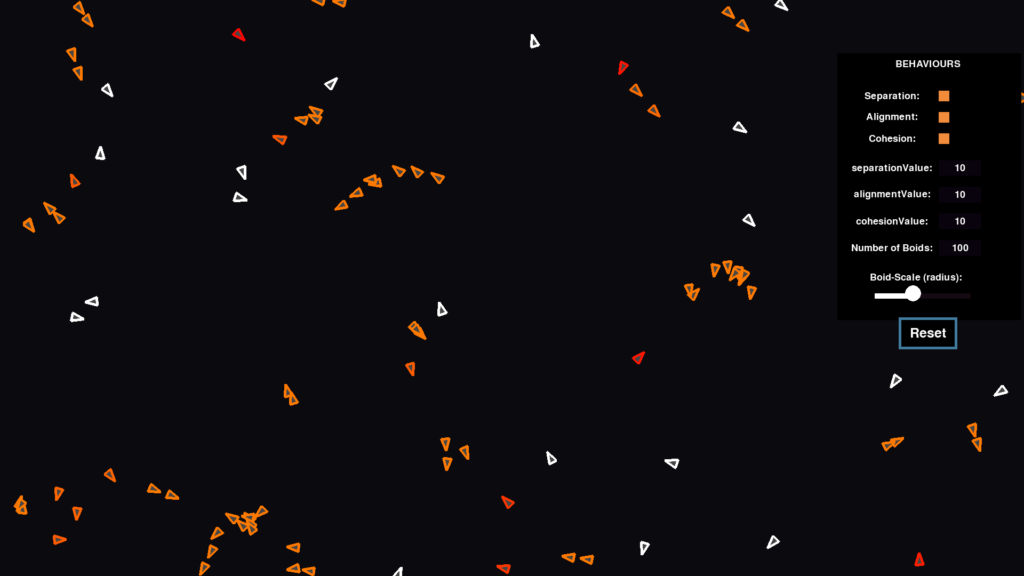
Physics engines work great for a handful of characters. They fall apart when you need 500 units moving at once. Every CharacterBody2D in Godot carries collision shapes, velocity solvers, and signal overhead that compounds fast. I hit this wall building a game with hundreds of units on screen and had to find a different approach.
Steering behaviors solve the problem with pure vector math. No physics bodies, no pathfinding graphs, no node overhead. Each unit is a dictionary with an x, y, and a velocity. You compute a steering force every frame, add it to velocity, and move the unit. The result is smooth, responsive game AI movement that scales to thousands of units on a single thread.
Key Takeaways
- Steering behaviors are vector math, not physics: compute a desired velocity, subtract the current velocity, and the difference is the steering force
- Avoidance uses edge-to-edge AABB distance: repulsion strength scales inversely with how close two units are, producing natural-looking collision avoidance
- Perpendicular projection prevents oscillation: project the avoidance vector onto the perpendicular of the desired direction so units only steer sideways, never backwards into a tug-of-war with their target
- Spatial grids make it fast: querying a grid cell is O(1) vs O(n) for checking every unit, and the whole system runs without physics bodies or pathfinding
What Are Steering Behaviors?
Steering behaviors are a family of algorithms introduced by Craig Reynolds in 1999 that produce smooth, autonomous movement from simple vector calculations. The core idea: compute a “desired velocity” pointing where the unit wants to go, subtract the current velocity, and the result is the steering force.
steering_force = desired_velocity - current_velocity
That single equation drives everything. Seek points the desired velocity toward a target. Flee points it away. Avoidance pushes away from nearby obstacles. You combine them by adding the vectors together with different weights.
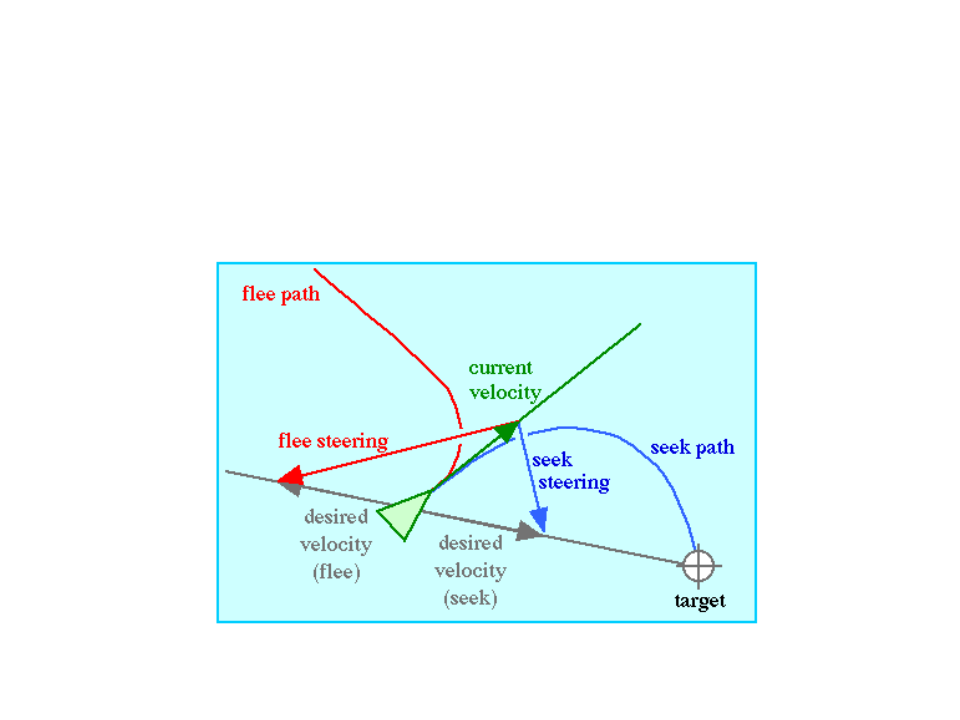
Reynolds organized autonomous movement into three layers: action selection (what to do), steering (how to move), and locomotion (the actual movement). Steering behaviors live in the middle layer. They don’t decide strategy or handle rendering. They just output a force vector that the locomotion layer applies.
Why Skip Physics for Unit Movement?
Godot’s CharacterBody2D gives you collision detection, move_and_slide, and signal-based interaction out of the box. For a platformer with 10 characters, that’s fine. For a game with 300+ units, it’s a performance trap.
Each CharacterBody2D adds a collision shape to the physics server. The physics server checks every shape against every other shape each frame. That’s O(n²) scaling in the worst case. At 200 units I was already seeing frame drops on mobile. At 500, the game was unplayable.
The stateless dictionary approach throws all of that away. Each unit is a plain Dictionary with position, velocity, size, and state fields. No nodes, no collision shapes, no physics overhead. You handle “collision” yourself through steering behaviors, using a spatial grid to keep neighbor queries fast.
The Architecture
The system has three pieces: a spatial grid for neighbor queries, a dictionary per unit for state, and steering functions that output Vector2 forces.
Spatial Grid
A SpatialGrid2D divides the world into cells. When you need to find units near a position, you check that cell and its neighbors instead of iterating every unit in the game. This turns neighbor queries from O(n) to O(1) for sparse distributions.
# Query returns only UIDs in nearby cells
var nearby: Array[int] = spatial_grid.get_units_near(ux, uy, radius)
The grid cell size should roughly match your largest avoidance radius. Too small and units span multiple cells (more lookups). Too large and cells contain too many units (more iteration per cell).
Unit Dictionaries
Every unit is a Dictionary. No class instances, no nodes. Just data.
var unit := {
    "uid": 42,
    "x": 500.0,
    "y": 300.0,
    "vx": 0.0,
    "vy": 0.0,
    "collision_width": 50.0,
    "collision_height": 30.0,
    "alive": true,
    "passable": false,
}
This keeps the data cache-friendly and avoids the overhead of Godot’s object system. You can iterate 1,000 of these in a tight loop without GC pauses or virtual dispatch. For rendering, pipe the positions into a MultiMesh each frame.
Steering Behaviors for Game AI: Avoidance
Avoidance is the behavior that keeps units from walking through each other. The approach here uses edge-to-edge AABB distance instead of center-to-center. This matters when units have different collision sizes, since center distance treats a large building and a small soldier the same way.
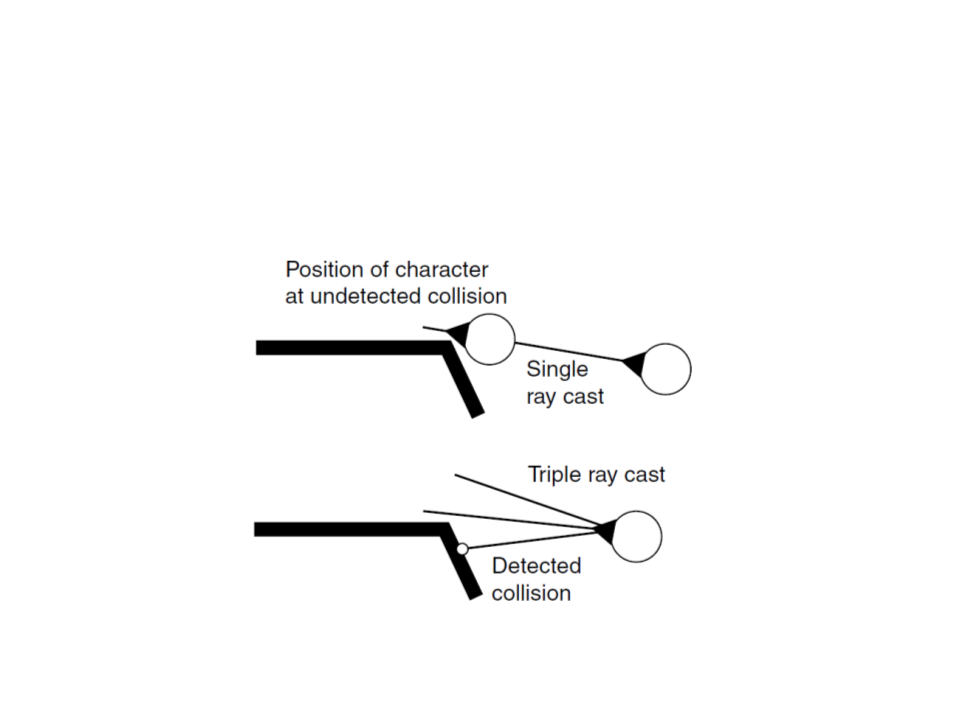
Here’s the full avoidance function from a working game. It takes a unit dictionary, a context dictionary containing the spatial grid, and an optional UID to exclude (so a unit chasing a target doesn’t try to avoid the target itself).
## Compute avoidance vector from nearby obstacles/impassable units.
## Skips passable units and exclude_uid (e.g., the seek target).
static func _compute_avoidance(unit: Dictionary, ctx: Dictionary, exclude_uid: int = -1) -> Vector2:
    var spatial_grid: SpatialGrid2D = ctx.get("spatial_grid")
    var uid_to_unit: Dictionary = ctx.get("uid_to_unit", {})
    var ux: float = unit.get("x", 0.0)
    var uy: float = unit.get("y", 0.0)
    var uid: int = unit.get("uid", -1)
    var avoid := Vector2.ZERO

    if spatial_grid == null:
        return avoid

    var half_w1: float = unit.get("collision_width", 50.0) / 2.0
    var half_h1: float = unit.get("collision_height", 30.0) / 2.0

    var nearby: Array[int] = spatial_grid.get_units_near(ux, uy, AVOIDANCE_RADIUS + MAX_COLLISION_HALF_W)
    for other_uid in nearby:
        if other_uid == uid or other_uid == exclude_uid:
            continue
        var other: Dictionary = uid_to_unit.get(other_uid, {})
        if other.is_empty() or other.get("passable", false):
            continue
        if not other.get("alive", true) or other.get("dead", false):
            continue

        var ox: float = other.get("x", 0.0)
        var oy: float = other.get("y", 0.0)
        var half_w2: float = other.get("collision_width", 50.0) / 2.0
        var half_h2: float = other.get("collision_height", 30.0) / 2.0

        # Edge-to-edge distance (AABB)
        var dx_edge: float = maxf(absf(ox - ux) - half_w1 - half_w2, 0.0)
        var dy_edge: float = maxf(absf(oy - uy) - half_h1 - half_h2, 0.0)
        var edge_dist: float = sqrt(dx_edge * dx_edge + dy_edge * dy_edge)

        if edge_dist >= AVOIDANCE_RADIUS:
            continue

        # Repulsion force inversely proportional to edge distance
        var dx: float = ux - ox
        var dy: float = uy - oy
        var center_dist: float = sqrt(dx * dx + dy * dy)
        if center_dist < 0.1:
            # Overlapping — push in random direction
            dx = randf_range(-1.0, 1.0)
            dy = randf_range(-1.0, 1.0)
            center_dist = 1.0

        var strength: float = 1.0 - (edge_dist / AVOIDANCE_RADIUS)
        avoid.x += (dx / center_dist) * strength
        avoid.y += (dy / center_dist) * strength

    return avoid
The key details worth calling out:
- Edge-to-edge AABB distance accounts for each unit's actual collision rectangle. Two large units start avoiding each other sooner than two small ones at the same center distance.
- The exclude_uid parameter lets a chasing unit ignore its seek target. Without this, a melee attacker would push away from the thing it's trying to reach.
- Passable units are skipped. Things like projectiles or visual effects that shouldn't block movement get a
passable: trueflag and are ignored. - The overlap fallback handles the edge case where two units land on the exact same pixel. Without the random nudge, the direction vector would be zero and the unit would be stuck.
- Strength scales linearly. Units at the edge of the avoidance radius get a gentle push. Units touching get the maximum force. This creates a smooth falloff instead of a hard boundary.
The Anti-Oscillation Problem
Avoidance by itself has a nasty failure mode. When a unit seeks a target with an obstacle directly between them, the avoidance vector points straight backwards, directly opposing the seek direction. The unit lurches forward, gets pushed back, lurches forward again. It oscillates in place and never reaches its target.
This is the single biggest problem with naive steering behavior implementations. Plenty of tutorials show avoidance and seek working independently, but the moment you combine them with obstacles between a unit and its target, the system breaks. The unit can't decide whether to go forward or backward, so it does both, forever.
The fix is a perpendicular projection. Instead of applying the raw avoidance vector (which can point backwards), you project it onto the line perpendicular to the desired movement direction. This constrains avoidance to only push the unit sideways relative to its target. It can steer left or right around an obstacle, but it can never steer backwards into a tug-of-war with the seek force.
The Side Dot Product
The math is four lines. Given a normalized desired direction (nx, ny), the perpendicular is (-ny, nx). Dot the avoidance vector against this perpendicular to get the sideways component, then scale the perpendicular by that amount.
# Perpendicular to desired direction (nx, ny)
var perp_x: float = -ny
var perp_y: float = nx

# How much avoidance pushes sideways
var side_dot: float = avoid.x * perp_x + avoid.y * perp_y

# Reconstruct avoidance using only the sideways component
var steer_x: float = perp_x * side_dot
var steer_y: float = perp_y * side_dot
The side_dot is the critical value. It measures how much of the avoidance force points left versus right relative to the unit's desired heading. A positive dot means "obstacle is to the right, steer left." A negative dot means "obstacle is to the left, steer right." A dot near zero means the obstacle is directly ahead or behind, and the perpendicular projection strips out the backward component entirely. That's what kills the oscillation.
Think of it like a train on rails. The unit's seek direction lays down the track. Avoidance can only nudge the unit sideways along the crossties. It can never reverse the train.
Putting It Together
Here's the full movement function that blends seek and avoidance using the perpendicular projection. This is from a production game running hundreds of units at 60fps.
static func _move_toward(unit: Dictionary, tx: float, ty: float,
        delta: float, speed_mult: float = 1.0, ctx: Dictionary = {},
        exclude_uid: int = -1) -> bool:
    var ux: float = unit.get("x", 0.0)
    var uy: float = unit.get("y", 0.0)
    var dx: float = tx - ux
    var dy: float = ty - uy
    var dist: float = sqrt(dx * dx + dy * dy)

    if dist < ARRIVE_THRESHOLD:
        unit["facing"] = 1 if dx >= 0 else -1
        return true

    var speed: float = unit.get("speed", 40.0) * speed_mult

    # Normalized desired direction
    var nx: float = dx / dist
    var ny: float = dy / dist

    if not ctx.is_empty():
        var avoid := _compute_avoidance(unit, ctx, exclude_uid)

        # Project avoidance onto the perpendicular of desired direction
        # so it only steers sideways, preventing oscillation
        var perp_x: float = -ny
        var perp_y: float = nx
        var side_dot: float = avoid.x * perp_x + avoid.y * perp_y
        var steer_x: float = perp_x * side_dot
        var steer_y: float = perp_y * side_dot

        nx += steer_x * AVOIDANCE_STRENGTH / maxf(speed, 1.0)
        ny += steer_y * AVOIDANCE_STRENGTH / maxf(speed, 1.0)

        # Re-normalize to maintain full speed
        var mag: float = sqrt(nx * nx + ny * ny)
        if mag > 0.01:
            nx /= mag
            ny /= mag

    var step: float = speed * delta
    unit["target_x"] = ux + nx * step
    unit["target_y"] = uy + ny * step
    unit["facing"] = 1 if nx > 0 else -1
    return false
A few things to notice in this implementation:
- Avoidance strength is divided by speed. Faster units need a proportionally smaller steer to change direction the same amount. Without this, fast units overreact and slow units underreact to the same obstacle.
- Re-normalization after adding steer. After blending the sideways avoidance into the desired direction, the vector gets re-normalized. This ensures the unit always moves at full speed. Without it, the blended direction could be shorter than 1.0, and the unit would slow down while steering.
- The exclude_uid carries through. The seek target's UID passes into
_compute_avoidanceso the unit never tries to avoid the thing it's chasing. A melee attacker heading for an enemy ignores that enemy in avoidance calculations. - Returns true on arrival. The
ARRIVE_THRESHOLDcheck at the top short-circuits the whole function. Once the unit is close enough to its target, it stops computing and returnstrueso the calling behavior knows movement is done.
⚡ Why not just weight avoidance lower than seek? That's the first thing most people try. Give seek a weight of 1.0 and avoidance 0.5 so seek always wins. It reduces oscillation but doesn't fix it. The unit still fights itself, just less visibly. It moves toward the target in a jittery, uncertain way. The perpendicular projection is a cleaner solution because it removes the backward component entirely instead of just weakening it.
Performance Tips
The whole point of this approach is performance. A few techniques that keep it fast at scale:
Stagger expensive queries. Not every unit needs to recompute its target every frame. Scan for targets every 10-15 frames and cache the result. Steering still runs every frame using the cached target, so movement stays smooth.
Size the spatial grid cells correctly. Cell size should be roughly 2x your avoidance radius. This keeps most neighbor queries to a single cell plus its 8 neighbors, for 9 cell checks total regardless of unit count.
Use MultiMesh for rendering. With dictionary units, you have no nodes to render. Push all positions into a MultiMesh2D each frame. This batches every unit into a single draw call. I've run 1,500 units at 60fps on a mid-range phone with this approach. For a deeper dive on the rendering side, see the guide to rendering thousands of game units on mobile.
Skip dead units early. The avoidance function already checks alive and dead flags. Make sure dead units are removed from the spatial grid immediately, not just flagged, so they don't show up in neighbor queries at all.
Debug with visual overlays. Draw the desired direction and the actual steered direction as lines during development. When units oscillate or bunch up, you can see exactly whether the perpendicular projection is doing its job. Store debug values on the unit dictionary (_dbg_desired_dx, _dbg_actual_dx) and render them as colored arrows.
Recommended Dev Gear
Long coding sessions on game AI systems are easier with the right setup. These three picks cover the essentials for game development work.
Game Programming Patterns
Design patterns for game AI and systems
Logitech G915 X TKL
Low-profile mechanical, wireless
BenQ RD280U
28" 3:2 4K+ programming display
Frequently Asked Questions
Do steering behaviors replace pathfinding?
No. Steering behaviors handle local movement: avoiding nearby obstacles, smooth velocity changes, and reactive course corrections. Pathfinding handles global navigation: finding a route from A to B across a complex map. Most games use both. A* or navigation meshes find the path, and steering behaviors handle the moment-to-moment movement along that path.
How many units can steering behaviors handle?
With dictionary-based units and a spatial grid, 1,000-2,000 units is realistic at 60fps on desktop. On mobile, expect 500-1,000 depending on the device and how many behaviors you stack per unit. The bottleneck shifts to rendering before steering math becomes the problem, which is why MultiMesh rendering matters.
Why use AABB edge distance instead of circle distance?
Game units are rarely perfect circles. A tank is wide and short. A soldier is narrow and tall. AABB (axis-aligned bounding box) edge distance respects those shapes. Two wide tanks side by side start avoiding each other sooner than two narrow soldiers at the same center distance. This produces more natural spacing.
What causes oscillation in steering behaviors?
Oscillation happens when the avoidance force directly opposes the seek force. A unit wants to move forward toward its target, but an obstacle pushes it straight back. The unit bounces between these two forces every frame. The fix is projecting avoidance onto the perpendicular of the desired direction so it can only push sideways, never backwards.
Can I use steering behaviors in 3D?
Yes. The math is identical, just with Vector3 instead of Vector2. The spatial grid becomes a 3D grid (or you can use a 2D grid if your units mostly move on a ground plane, which is common for RTS and action games). The perpendicular projection extends naturally: compute a perpendicular plane to the desired direction and project avoidance onto it.
Summary
Steering behaviors give you smooth, scalable AI movement without the overhead of physics engines. The core pattern is always the same: compute a desired direction, subtract the current velocity, and apply the result as a force. The perpendicular projection trick is what makes avoidance work in practice. Without it, units oscillate the moment an obstacle sits between them and their target. With it, they steer sideways and keep moving forward.
The stateless dictionary approach keeps everything fast. No nodes, no collision shapes, no garbage collection pressure. Pair it with a spatial grid for neighbor queries and MultiMesh for rendering, and you can push well past 1,000 units on modest hardware. If your game needs crowds, armies, or swarms, this is the architecture to start with. For more on the decision-making side of game AI, check out the behavior tree guide.