With over 400 million gamers worldwide living with disabilities, accessibility isn’t just a nice-to-have, it’s essential for reaching your full audience. Here’s how to build inclusive games from day one without breaking your indie budget.
Table of Contents
- Why Accessibility Matters for Indie Games
- Core Accessibility Features Every Game Needs
- Visual Accessibility Design
- Motor and Input Accessibility
- Cognitive Accessibility
- Audio and Hearing Accessibility
- Implementation Without Scope Creep
- Testing Your Accessibility Features
- Pro Tips
- FAQ
Quick Answer
- Start early, Retrofitting accessibility is 10x harder than building it in
- Focus on remapping, Full control remapping covers the widest range of needs
- Subtitles are baseline, Include speaker identification and sound descriptions
- Test with real users, Disabled gamers provide insights you’ll never get otherwise
- Document everything, Players need to know what features exist before buying
Why Accessibility Matters for Indie Games
The gaming disability community represents a massive, underserved market. According to the CDC, 26% of US adults live with some form of disability. That’s not a niche, that’s over a quarter of your potential players.
Beyond market reach, accessibility features often benefit everyone. Subtitles help players in noisy environments. Control remapping lets anyone optimize their setup. Colorblind modes improve visual clarity for all players.
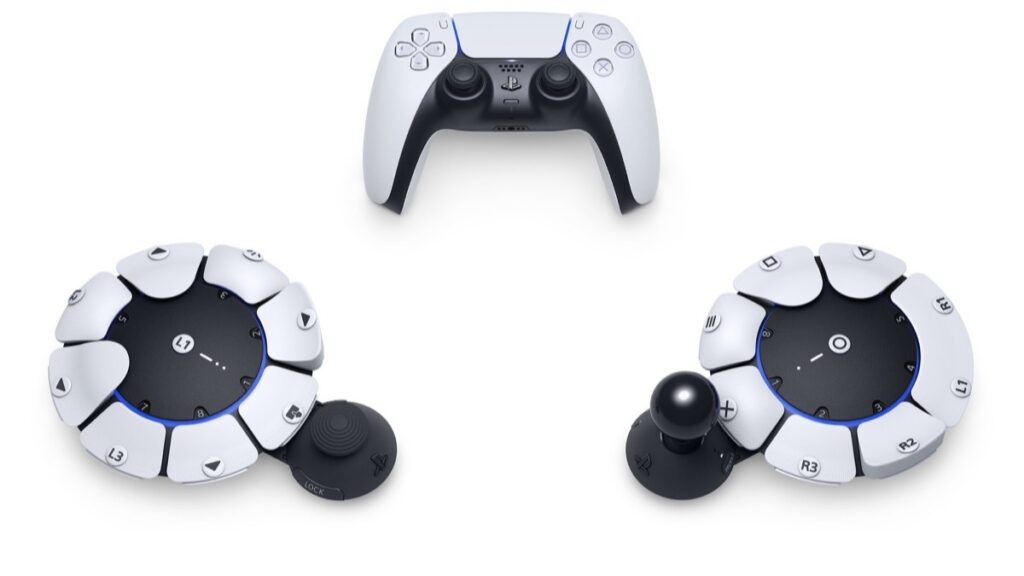
The Xbox Adaptive Controller and PlayStation Access Controller have shown mainstream hardware manufacturers taking accessibility seriously. Players now expect games to meet them halfway.
Core Accessibility Features Every Game Needs
Not every game needs every accessibility feature. But certain baseline features should be standard in 2026:
Control Remapping
Let players rebind every action to any input. This single feature addresses motor disabilities, one-handed play, and personal preference simultaneously.
Subtitles with Options
Include font size scaling, background opacity, speaker identification, and ideally sound effect descriptions. Don’t lock subtitles behind a menu, make them available from first launch.
Pause Anywhere
Players may need to stop unexpectedly. If your game can be paused without breaking, let it be paused. Even in multiplayer, consider graceful disconnection handling.
Difficulty Options
Separate difficulty from accessibility. A player might want combat assistance but still experience full story content. Celeste’s Assist Mode remains the gold standard here.
Visual Accessibility Design
Visual accessibility covers blindness, low vision, colorblindness, and photosensitivity.
Colorblind Modes
Don’t just slap a filter on your game. Design UI elements to differ in shape, pattern, or icon, not just color. About 8% of men have some form of colorblindness.
High Contrast Options
Offer modes that increase visual distinction between gameplay elements and backgrounds. The Last of Us Part II’s high contrast mode outlines interactive elements in distinct colors.
Screen Reader Support
For menu navigation, support screen readers or implement text-to-speech. Blind players navigate primarily through audio cues, make your menus readable.
Photosensitivity Settings
Reduce or eliminate flashing effects. The Photosensitive Epilepsy Analysis Tool (PEAT) can help identify problematic sequences during development.
Motor and Input Accessibility
Motor accessibility ensures players with limited mobility, chronic pain, or fatigue can still play.
One-Handed Play
If possible, offer control schemes that work with a single hand. Some games achieve this through auto-aim, hold-to-toggle options, or simplified control modes.
Adjustable Timing
QTEs and timed sequences exclude many players. Offer extended timers, auto-complete options, or skip functionality for time-sensitive sections.
Input Sensitivity
Let players adjust dead zones, sensitivity curves, and input thresholds. What feels responsive to one player may be unusable for another.
Auto-Aim and Aim Assist
Precision aiming is physically impossible for many players. Graduated aim assist options let players find their comfort level without removing all challenge.
Cognitive Accessibility
Cognitive accessibility addresses ADHD, dyslexia, memory issues, and processing differences.
Clear Objectives
Always show current objectives. Let players review past dialogue and instructions. Don’t rely on players remembering things from hours ago.
Navigation Assistance
Waypoints, minimaps, and objective markers help players who struggle with spatial memory. Make these toggleable for players who don’t need them.
Reading Assistance
Offer dyslexia-friendly fonts as an option. OpenDyslexic is free and widely recognized. Also consider text-to-speech for dialogue.
Reduced Complexity Options
Some players benefit from simplified interfaces, fewer simultaneous enemies, or streamlined mechanics. These shouldn’t remove content, just reduce cognitive load.
Audio and Hearing Accessibility
Deaf and hard-of-hearing players need visual alternatives to audio information.
Comprehensive Subtitles
Caption all dialogue, including ambient conversations. Use speaker labels. Different colors for different speakers help track conversations.
Sound Visualization
Show directional indicators for important sounds, footsteps, gunshots, environmental hazards. Fortnite’s visualize sound effects feature is an excellent reference.
Separate Volume Controls
Provide individual sliders for music, sound effects, dialogue, and ambient audio. Players may need to boost dialogue while reducing everything else.
Implementation Without Scope Creep
Indie developers worry accessibility will balloon their scope. Here’s how to manage it:
Prioritize by Impact
Control remapping and subtitles cover the widest range of disabilities with relatively low implementation cost. Start there.
Build Modular Systems
Design your input and UI systems to be configurable from the start. Adding remapping later means rewriting your input handling.
Use Existing Plugins
Unity and Unreal have accessibility plugins. The Game Accessibility Guidelines (gameaccessibilityguidelines.com) provides free, structured implementation advice.
Scope Appropriately
A text-heavy visual novel needs different accessibility than a fast-paced shooter. Focus on what matters for your genre.
Testing Your Accessibility Features
Accessibility features that don’t work are worse than none, they build false expectations.
Consult Disabled Players Early
Organizations like AbleGamers, SpecialEffect, and Can I Play That? connect developers with disabled testers. Their feedback is invaluable.
Test Across Devices
Accessibility features should work with adaptive controllers, switch devices, and assistive technology. Don’t assume standard input.
Document Your Features
Create an accessibility page or section. Can I Play That? and the Family Video Game Database rate games on accessibility, provide them the information they need.
Pro Tips
- Check the Game Accessibility Guidelines at gameaccessibilityguidelines.com, it’s free and comprehensive
- Join the IGDA Game Accessibility SIG for community support and resources
- Test your colorblind modes with actual colorblind players, not just filters
- Make accessibility options available before gameplay starts, including in tutorials
- Consider accessibility in your marketing, disabled players actively search for accessible games
- The Xbox Accessibility Guidelines are public and applicable beyond Xbox
- Remember: Good accessibility often makes games better for everyone
FAQ
How much does accessibility add to development time?
If built in from the start, minimal, maybe 10-15% for comprehensive features. Retrofitting can double that or more. The earlier you plan, the lower the cost.
Do I need every accessibility feature?
No. Focus on features relevant to your genre and player base. A rhythm game needs different accessibility than an RPG. Prioritize impact over completeness.
Will accessibility features affect my game’s difficulty or artistic vision?
Only if you let them. Accessibility options are optional. Players who want the full challenge can ignore them. Celeste proves hardcore games can be fully accessible.
Where can I find disabled playtesters?
AbleGamers, SpecialEffect, and Can I Play That? all facilitate connections between developers and disabled gamers. Many accessibility consultants also provide testing services.
Should I add accessibility features post-launch?
Yes, if you can. Players appreciate ongoing accessibility improvements. Document what features exist and what you’re working on, transparency builds trust.
Summary
Game accessibility isn’t charity, it’s good design that expands your audience while improving the experience for everyone. Start with control remapping and subtitles, build modular systems that accommodate future additions, and test with real disabled players. The indie games leading on accessibility aren’t just doing the right thing, they’re reaching players their competitors ignore.