After building dialogue systems for three different games, I can tell you the architecture decisions you make early on will either save you hundreds of hours or create a debugging nightmare. Here’s what actually works.
Whether you’re creating a branching narrative RPG or just need NPCs to say “Hello, adventurer!” at the right moment, a well-designed dialogue system is the foundation of player immersion. This guide breaks down the practical approaches that indie developers use to ship dialogue-heavy games without losing their minds.
Table of Contents
- Quick Answer
- What Is a Dialogue System?
- Core Architecture Patterns
- The Node-Based Approach
- State Management and Variables
- Middleware Tools Worth Using
- Implementation Tips That Actually Matter
- Pro Tips
- FAQ
- Summary
Quick Answer
- Simple games: Use a data-driven approach with JSON/CSV files and a basic parser
- Branching narratives: Implement a node-graph system or use middleware like Yarn Spinner or Ink
- Complex RPGs: Combine node graphs with a condition/trigger system for world state integration
- Most important: Separate your dialogue data from your game logic—always
What Is a Dialogue System?
A dialogue system manages how conversations flow between the player and NPCs (or between NPCs themselves). At its core, it handles three things:
1. Data Storage
Where your dialogue text, speaker information, and branching logic live. This could be JSON files, custom data structures, or external tools.
2. Flow Control
The logic that determines which dialogue node plays next based on player choices, game state, or conditions.
3. Presentation
The UI layer that displays text, handles typewriter effects, shows portraits, and manages player input.
The mistake most developers make is coupling these too tightly. Keep them separate, and your system becomes infinitely more maintainable.
Core Architecture Patterns
There are three main approaches to dialogue system architecture, each with different trade-offs:
Linear Dialogue (Simplest)
Best for: Cutscenes, tutorials, simple NPCs
Structure: An array of dialogue entries played in sequence. No branching, no conditions—just text displayed one after another.
[
  {"speaker": "Guard", "text": "Halt! Who goes there?"},
  {"speaker": "Player", "text": "Just a traveler."},
  {"speaker": "Guard", "text": "Move along then."}
]
This works for 80% of background NPC dialogue. Don’t overcomplicate it.
Branching Trees (Intermediate)
Best for: Quest dialogues, story-driven conversations
Structure: Each node contains dialogue text plus connections to other nodes based on player choices.
The key insight: dialogue trees are essentially state machines. Each node is a state, each choice is a transition. Once you see it this way, the implementation becomes much clearer.
Graph Networks (Advanced)
Best for: Complex RPGs with interconnected storylines
Structure: Nodes can connect to any other node (not just children), allowing for loops, convergent paths, and dynamic routing based on game state.
This is what games like Disco Elysium use—conversations that can jump around based on skills, inventory items, or previous dialogue choices across the entire game.
The Node-Based Approach
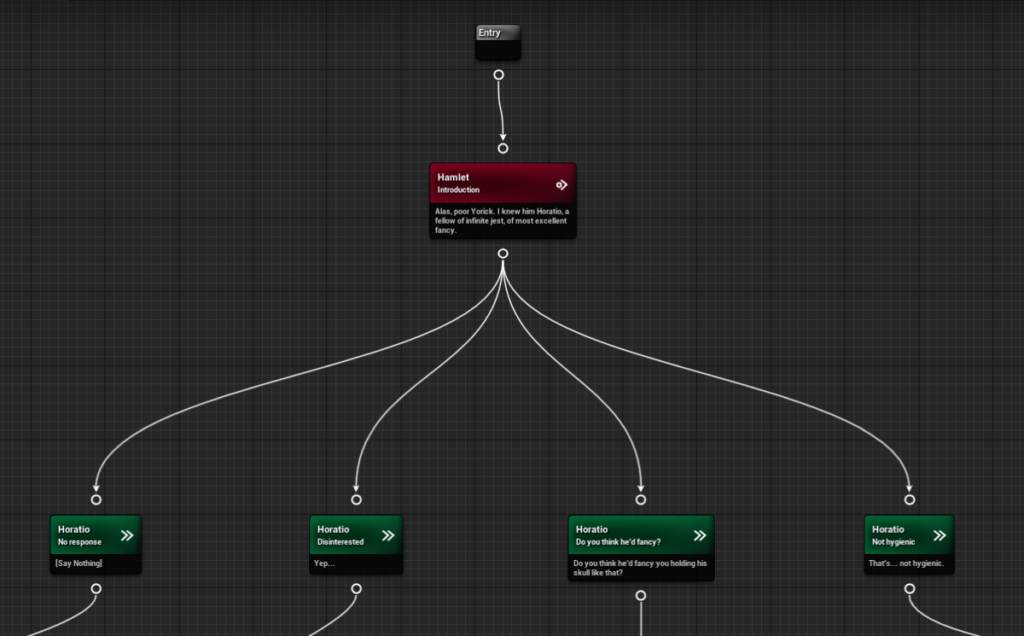
Most modern dialogue systems use some form of node-based architecture. Here’s why it works:
Visual Editing: Writers and designers can see the conversation flow at a glance. No digging through spreadsheets.
Reusability: Common responses (like “Goodbye”) can be single nodes referenced from multiple places.
Modularity: You can swap out entire conversation branches without touching the rest of the system.
Essential Node Types
Speech Node: Displays dialogue text from a specific speaker
Choice Node: Presents player with response options
Condition Node: Branches based on game state (inventory, flags, stats)
Event Node: Triggers game actions (give item, start quest, play animation)
Random Node: Selects randomly from connected outputs
Start with Speech and Choice nodes. Add the others as you need them—don’t build complexity before you need it.
State Management and Variables
This is where most dialogue systems get messy. You need to track:
Local Variables: Conversation-specific state (has the player asked about the treasure?)
Global Variables: World state that affects dialogue (is the king dead? has the war started?)
Persistent Flags: Things that should survive save/load cycles
The Clean Approach
Create a DialogueContext object that gets passed into your dialogue system when a conversation starts. This context contains references to all the game state your dialogues might need to query.
class DialogueContext {
    player_stats: Stats
    inventory: Inventory
    quest_journal: QuestJournal
    world_flags: Dictionary
}
Your condition nodes check against this context—they never reach directly into game systems. This keeps your dialogue system portable and testable.
Middleware Tools Worth Using
You don’t have to build everything from scratch. These tools have been battle-tested on shipped games:
Yarn Spinner
Best for: Unity developers, narrative games
Strength: Clean scripting language, excellent Unity integration
Learning curve: Low—you can be productive in an afternoon
Yarn Spinner uses a simple markup language that writers can learn quickly. It powers games like Night in the Woods and A Short Hike.
Ink
Best for: Text-heavy games, complex branching
Strength: Powerful conditional logic, great for testing narrative
Learning curve: Medium—more features means more to learn
Created by Inkle (80 Days, Heaven’s Vault), Ink excels at complex narrative state. It has its own IDE (Inky) and integrates with most engines.
Arcweave
Best for: Teams with dedicated writers
Strength: Visual graph editor, collaboration features
Learning curve: Low for writers, medium for programmers
Arcweave is a web-based tool that exports to multiple formats. Good for separating writing from implementation.
Articy:draft
Best for: Large-scale productions
Strength: Professional-grade features, database backing
Learning curve: High—significant time investment
The industry standard for AAA narrative design. Overkill for most indie projects, but worth knowing about.
Roll Your Own?
Building a custom system makes sense when:
- Your dialogue has unique requirements (real-time, multiplayer, procedural)
- You need deep integration with game mechanics
- You want complete control over the data format
But be honest about the time cost. A basic node graph editor alone is 40+ hours of work.
Implementation Tips That Actually Matter
Separate Data from Logic
Your dialogue data (text, speaker, connections) should live in external files that can be edited without recompiling. Your dialogue runtime reads and executes this data.
This separation means writers can iterate on dialogue while you work on features. It also makes localization dramatically easier.
Build the UI Last
Get your dialogue data and flow logic working with debug output first. The pretty text boxes and portrait animations are polish—make sure the system works before you make it look good.
Support Hot Reloading
Being able to edit dialogue files and see changes without restarting the game will save you (and your writers) hundreds of hours over the project lifetime.
Plan for Localization Early
Use string keys that map to localized text, not hardcoded strings. Structure your data so translators can work with it easily. Trust me—retrofitting localization into a dialogue system is painful.
Test Conversations Standalone
Build a way to run dialogues outside your game. This lets writers test their work without navigating to the right NPC in the right game state every time.
Pro Tips
- Use unique IDs for every node—you’ll need them for saves, analytics, and debugging
- Log conversation paths during playtesting—find out which branches players never see
- Build a “conversation debugger” that shows the current node, available choices, and relevant variables
- Keep your base node types simple—extend through composition, not inheritance
- Version your dialogue data format—you will need to migrate old files eventually
- Cache speaker data (portraits, voice references) at conversation start, not per-line
- Build skip functionality from day one—playtesters and speedrunners will thank you
FAQ
How do I handle voiced dialogue?
Add audio clip references to your speech nodes. The presenter layer plays the audio while displaying text. For timing, either use audio duration or embed timing markers in your data.
What’s the best way to store dialogue data?
JSON works for most projects—human-readable, widely supported, easy to parse. For very large games, consider SQLite or a custom binary format for faster loading.
How do I implement a dialogue history/log?
Store each displayed speech node’s ID and text in a list as the conversation progresses. Persist this list if players should be able to review past conversations.
Should dialogue affect gameplay directly?
Use event nodes that emit signals/events rather than directly modifying game state. This keeps your dialogue system decoupled and makes it easier to track what triggered gameplay changes.
How complex should conditions be?
Start with simple boolean flags. Add numeric comparisons when you need them. Only implement full expression parsing if your designers are actually requesting it—most dialogue conditions are simple.
Summary
A good dialogue system is invisible to players but transformative for your development workflow. Start simple: data-driven storage, clean separation of concerns, and basic node types. Add complexity only when your game demands it.
The best system is one your writers can use confidently and your code can extend cleanly. Whether you choose established middleware or roll your own, keep the architecture flexible and the editing experience smooth. Your future self (and your team) will thank you.